# 2.	CLOUD QUERY

CLOUD QUERY là một công cụ mạnh mẽ để truy vấn và tích hợp dữ liệu từ nhiều nguồn khác nhau. Với các biểu thức, cú pháp truy vấn và các hàm chức năng để hỗ trợ người dùng hệ thống dễ dàng truy vấn và tích hợp dữ liệu từ các nguồn về một tập dữ liệu duy nhất, giúp tạo ra những cái nhìn toàn diện và tổng hợp về dữ liệu.

# 2.1. Nối các tập dữ liệu

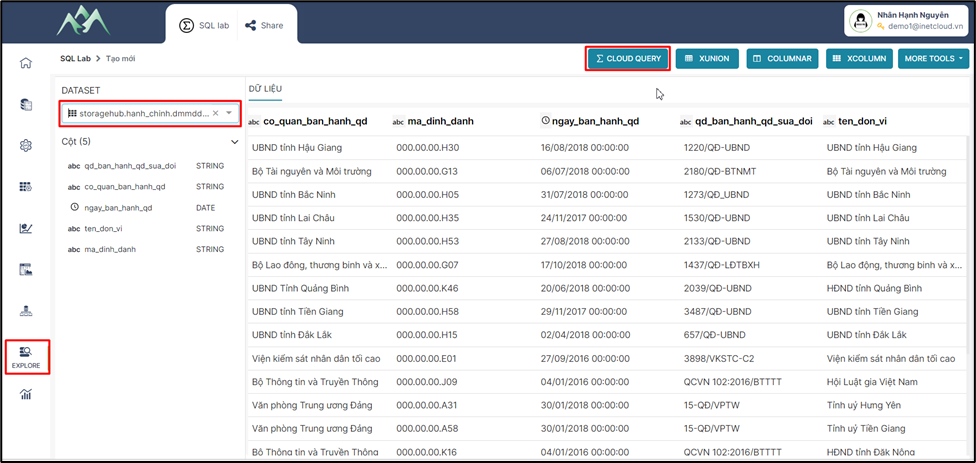
<span style="mso-fareast-font-family: 'Times New Roman';"><span style="mso-list: Ignore;">-<span style="font: 7.0pt 'Times New Roman';"> </span></span></span>Bước 1: Xác định tập dữ liệu đầu vào. Trên hệ thống chọn module Explore, chọn tập dữ liệu cần tổng hợp và chọn CLOUD QUERY.
<span style="mso-no-proof: yes;">![](https://book.inetcloud.vn/uploads/images/gallery/2024-07/embedded-image-znnxm7dg.png)  
</span>

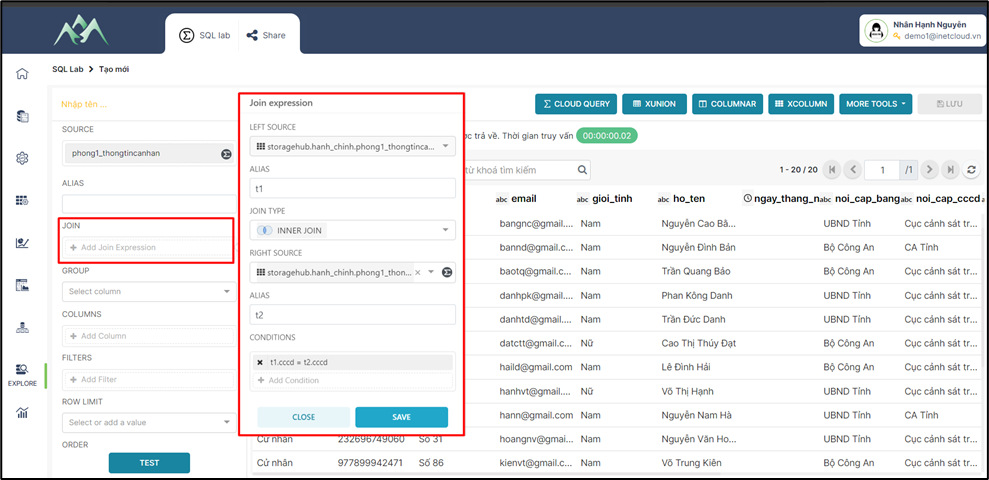
<span style="mso-fareast-font-family: 'Times New Roman';"><span style="mso-list: Ignore;">-<span style="font: 7.0pt 'Times New Roman';"> </span></span></span>Bước 2: Xác định tập dữ liệu cần tổng hợp với tập dữ liệu đầu vào. Cấu hình điều kiện nối các tập dữ liệu trên hệ thống.
<span style="mso-no-proof: yes;">![](https://book.inetcloud.vn/uploads/images/gallery/2024-07/embedded-image-lrlltvhr.png)  
</span>

Trong đó:

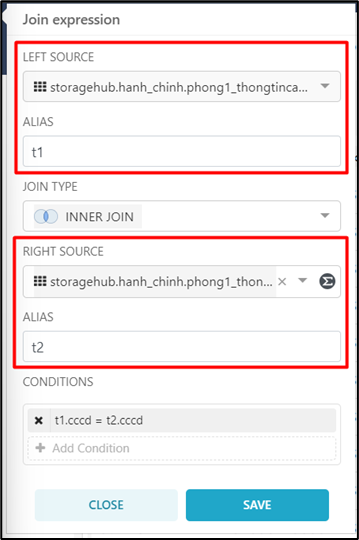
<span style="font-family: 'Courier New'; mso-fareast-font-family: 'Courier New';"><span style="mso-list: Ignore;">o<span style="font: 7.0pt 'Times New Roman';"> </span></span></span>LEFT SOURCE: Tập dữ liệu ban đầu (bảng 1) cần thực hiện kết nối với tập dữ liệu khác.

<span style="font-family: 'Courier New'; mso-fareast-font-family: 'Courier New';"><span style="mso-list: Ignore;">o<span style="font: 7.0pt 'Times New Roman';"> </span></span></span>ALIAS: Đặt tên liên kết cho các trường thuộc tính của tập dữ liệu ban đầu. Mục tiêu để sau khi nối các tập dữ liệu lại với nhau sẽ dễ phân biệt trường thuộc tính thuộc tập dữ liệu nào.
<span style="mso-no-proof: yes;">![](https://book.inetcloud.vn/uploads/images/gallery/2024-07/embedded-image-2ssh1jzl.png)  
</span>

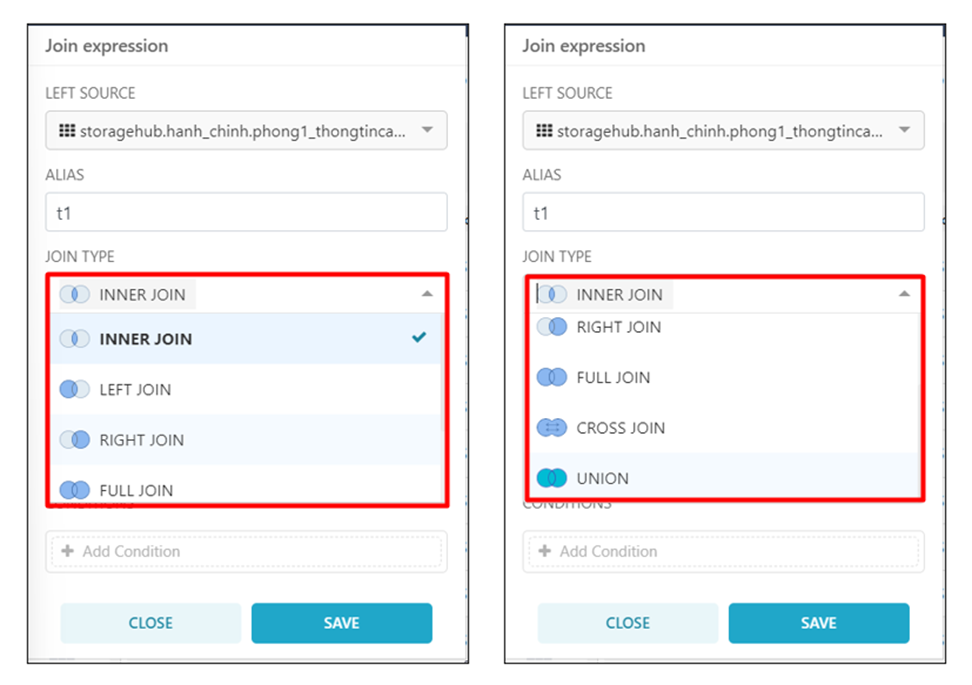
<span style="font-family: 'Courier New'; mso-fareast-font-family: 'Courier New'; mso-no-proof: yes;"><span style="mso-list: Ignore;">o<span style="font: 7.0pt 'Times New Roman';"> </span></span></span>JOIN TYPE: Chọn loại kế<span style="color: rgb(0, 0, 0);">t nối, chi tiết các loại kết nối có thể xem thêm tại "Tài liệu sử dụng Cloud query, đường dẫn [https://book.inetcloud.vn/books/tai-lieu-su-dung-cloud-query ](https://book.inetcloud.vn/books/tai-lieu-su-dung-cloud-query/page/23-joins)"</span>

<span style="mso-no-proof: yes;">![](https://book.inetcloud.vn/uploads/images/gallery/2024-07/embedded-image-bllx5up0.png)  
</span>

<span style="font-family: 'Courier New'; mso-fareast-font-family: 'Courier New';"><span style="mso-list: Ignore;">o<span style="font: 7.0pt 'Times New Roman';"> </span></span></span>RIGHT SOURCE: Chọn tập dữ liệu (bảng 2) nối với tập dữ liệu ban đầu (bảng 1).

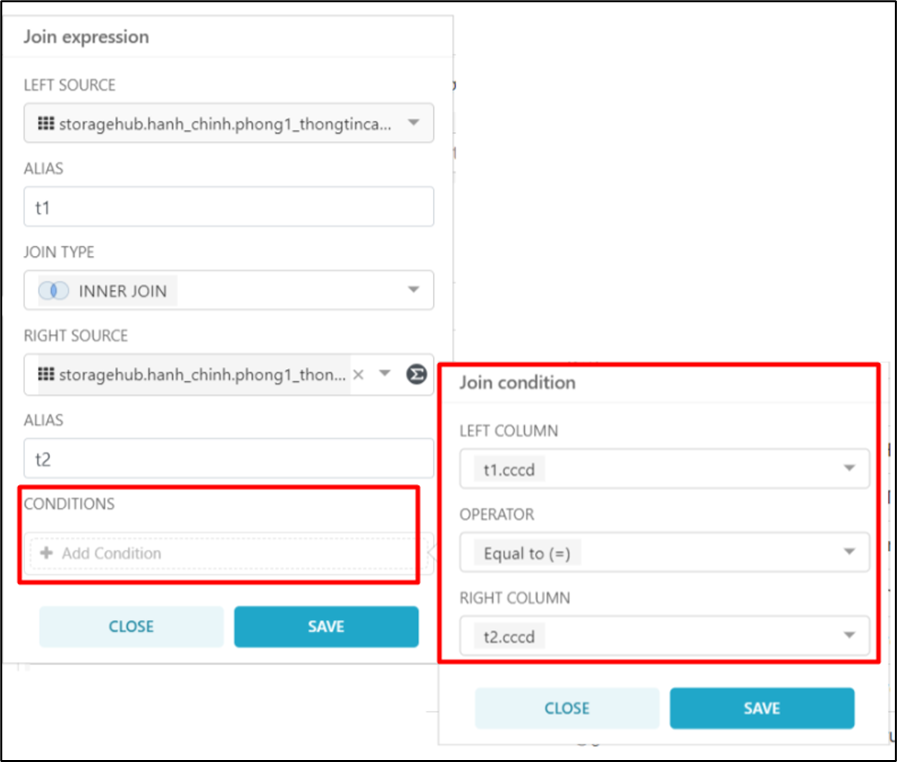
<span style="font-family: 'Courier New'; mso-fareast-font-family: 'Courier New';"><span style="mso-list: Ignore;">o<span style="font: 7.0pt 'Times New Roman';"> </span></span></span>CONDITIONS: Chọn trường dữ liệu là điều kiện để nối các tập dữ liệu. Cột điều kiện hay còn gọi là khóa chính để tổng hợp các giá trị tương đồng giữa các tập dữ liệu.
<span style="mso-no-proof: yes;">![](https://book.inetcloud.vn/uploads/images/gallery/2024-07/embedded-image-i6n73umk.png)  
</span>

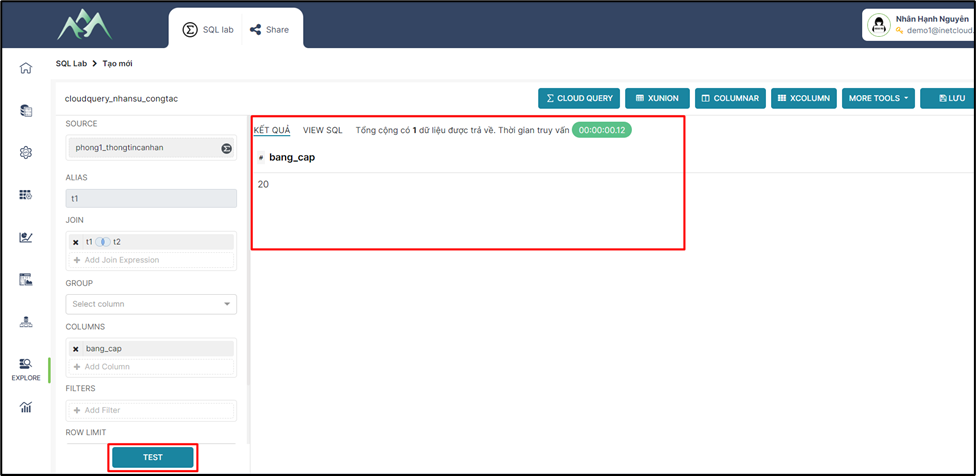
<span style="mso-fareast-font-family: 'Times New Roman';"><span style="mso-list: Ignore;">-<span style="font: 7.0pt 'Times New Roman';"> </span></span></span>Bước 3: Thực hiện kết hợp các bảng theo cột khóa . Trên hệ thống ấn TEST để xem kết quả dữ liệu được nối giữa các tập dữ liệu.
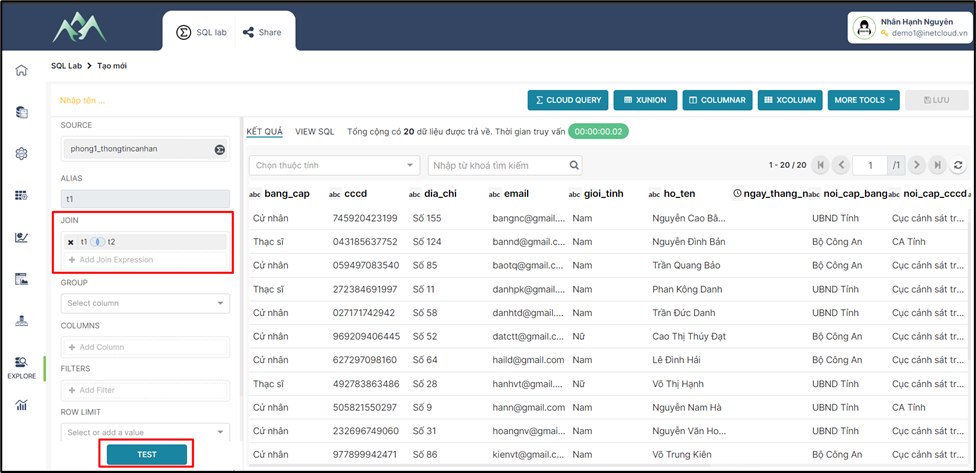
<span style="mso-no-proof: yes;">![](https://book.inetcloud.vn/uploads/images/gallery/2024-07/embedded-image-ba3rqrji.png)  
</span>

<span style="mso-fareast-font-family: 'Times New Roman';"><span style="mso-list: Ignore;">-<span style="font: 7.0pt 'Times New Roman';"> </span></span></span>Bước 4: Nhập tên cho tập dữ liệu mới được tổng hợp, chọn Lưu thông tin tập dữ liệu được tổng hợp bằng công cụ CLOUD QUERY.
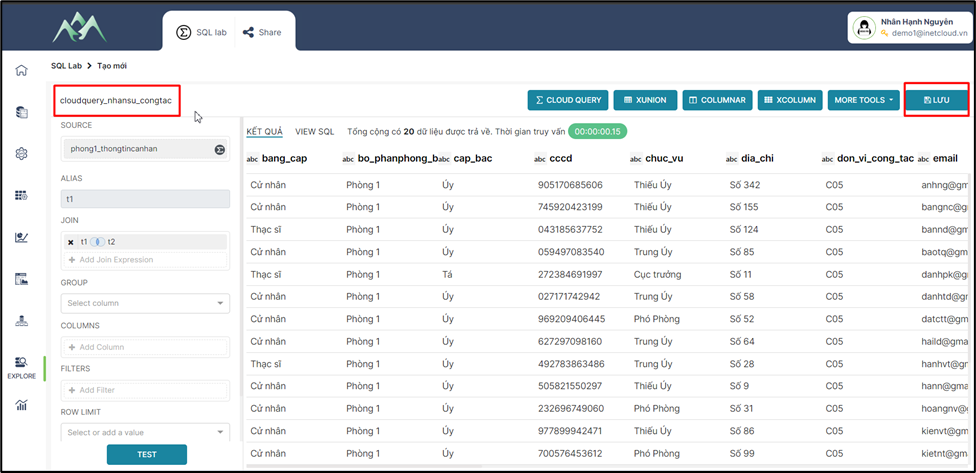
<span style="mso-no-proof: yes;">![](https://book.inetcloud.vn/uploads/images/gallery/2024-07/embedded-image-lvd602c2.png)  
</span>

***Lưu ý****: Để xử lý các cột/trường dữ liệu xem hướng dẫn chi tiết tại mục 2.2*

# 2.2. Xử lý các cột/trường dữ liệu bằng các hàm, thuật toán (Simple column)

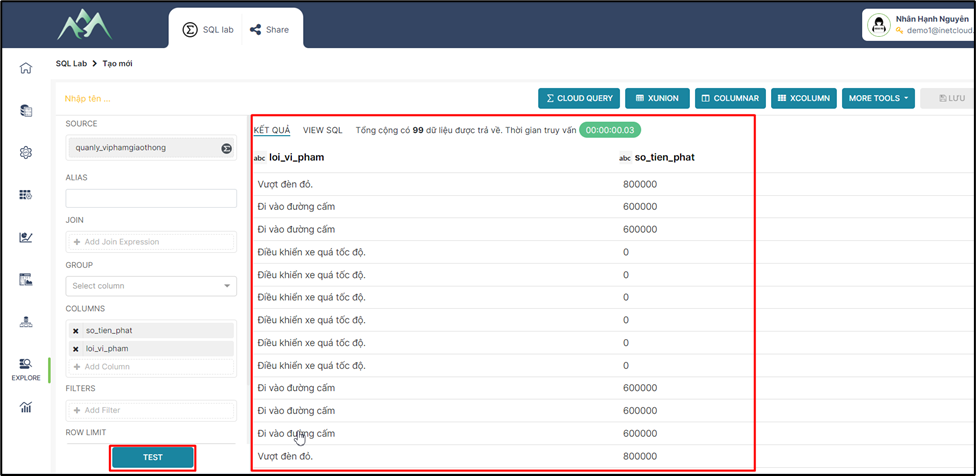
<span style="mso-fareast-font-family: 'Times New Roman';"><span style="mso-list: Ignore;">-<span style="font: 7.0pt 'Times New Roman';"> </span></span></span>Bước 1: Chọn các cột/trường dữ liệu cần cho tập dữ liệu
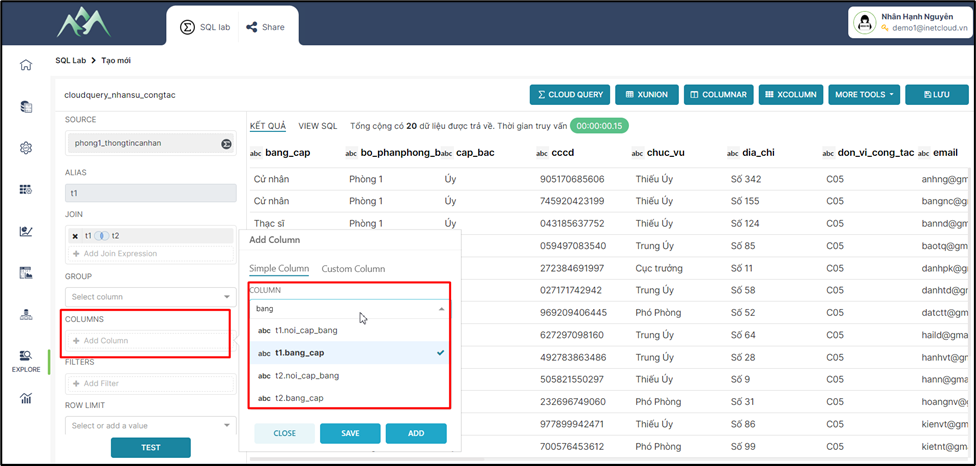
<span style="mso-no-proof: yes;">![](https://book.inetcloud.vn/uploads/images/gallery/2024-07/embedded-image-0s2ywpyi.png)  
</span>

<span style="mso-fareast-font-family: 'Times New Roman';"><span style="mso-list: Ignore;">-<span style="font: 7.0pt 'Times New Roman';"> </span></span></span>Bước 2: Chọn hàm/thuật toán xử lý cột/trường dữ liệu được chọn
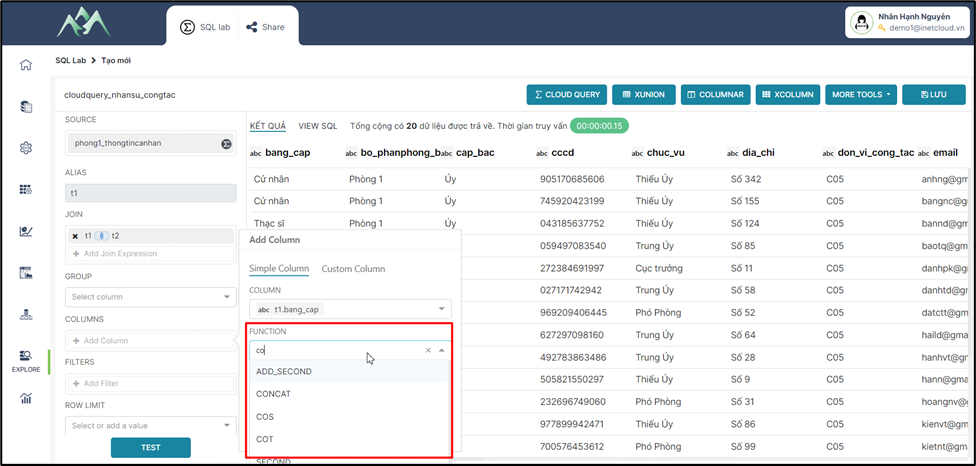
<span style="mso-no-proof: yes;">![](https://book.inetcloud.vn/uploads/images/gallery/2024-07/embedded-image-x2wteq2u.png)  
</span>

***Lưu ý****: <span style="color: rgb(0, 0, 0);">Xem tài liệu theo đường dẫn [https://book.inetcloud.vn/books/tai-lieu-su-dung-cloud-query/chapter/chuong-4-cac-ham-chuc-nang](https://book.inetcloud.vn/books/tai-lieu-su-dung-cloud-query/chapter/chuong-4-cac-ham-chuc-nang) này để chi tiết hơn về ý nghĩa và chức năng của các hàm/thuật toán cần sử dụng.</span>*

<span style="mso-fareast-font-family: 'Times New Roman';"><span style="mso-list: Ignore;">-<span style="font: 7.0pt 'Times New Roman';"> </span></span></span>Bước 3: Đặt tên mới cho cột/trường dữ liệu. Hệ thống sẽ mặc định hiển thị tên cũ của cột/trường dữ liệu nếu không cập nhật tên mới.
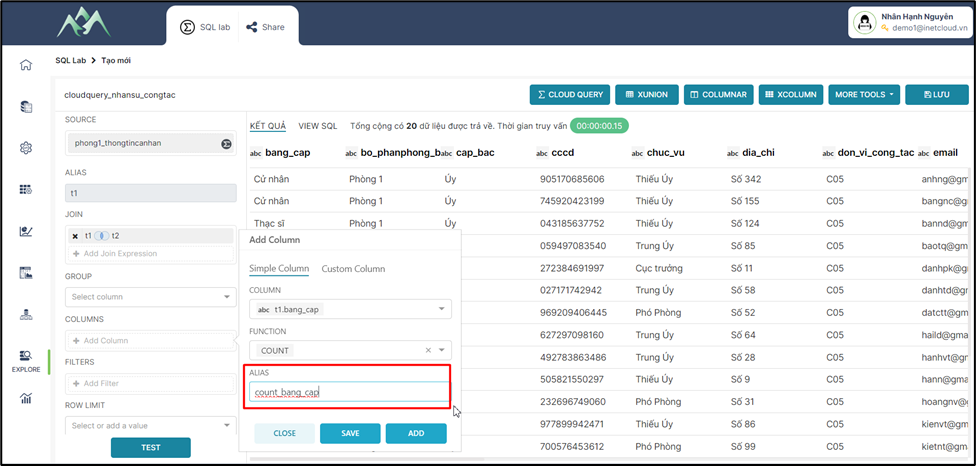
<span style="mso-no-proof: yes;">![](https://book.inetcloud.vn/uploads/images/gallery/2024-07/embedded-image-mdqm6t9z.png)  
</span>

<span style="mso-fareast-font-family: 'Times New Roman';"><span style="mso-list: Ignore;">-<span style="font: 7.0pt 'Times New Roman';"> </span></span></span>Bước 4: Ấn ADD/SAVE để lưu cột dữ liệu vào tập dữ liệu hiện tại. Trong đó: ADD sẽ lưu và hiển thị lại giao diện để thực hiện thêm cột dữ liệu khác, SAVE sẽ lưu cột dữ liệu thêm mới và đóng bảng Add column.
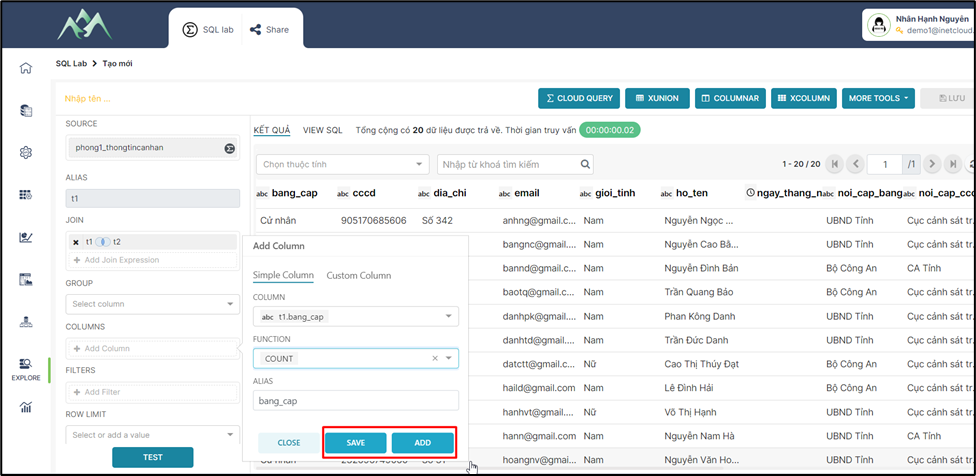
<span style="mso-no-proof: yes;">![](https://book.inetcloud.vn/uploads/images/gallery/2024-07/embedded-image-nevuynsg.png)  
</span>

<span style="mso-fareast-font-family: 'Times New Roman';"><span style="mso-list: Ignore;">-<span style="font: 7.0pt 'Times New Roman';"> </span></span></span>Bước 5: Ấn TEST để xem kết quả dữ liệu

<span style="mso-no-proof: yes;">![](https://book.inetcloud.vn/uploads/images/gallery/2024-07/embedded-image-g60os0mc.png)  
</span>

# 2.3. Thêm cột/trường dữ liệu mới dựa trên điều kiện (Custom column - Case)

<span style="mso-fareast-font-family: 'Times New Roman';"><span style="mso-list: Ignore;">-<span style="font: 7.0pt 'Times New Roman';"> </span></span></span>Bước 1: Chọn biểu thức CASE thực hiện thêm mới cột/trường dữ liệu.
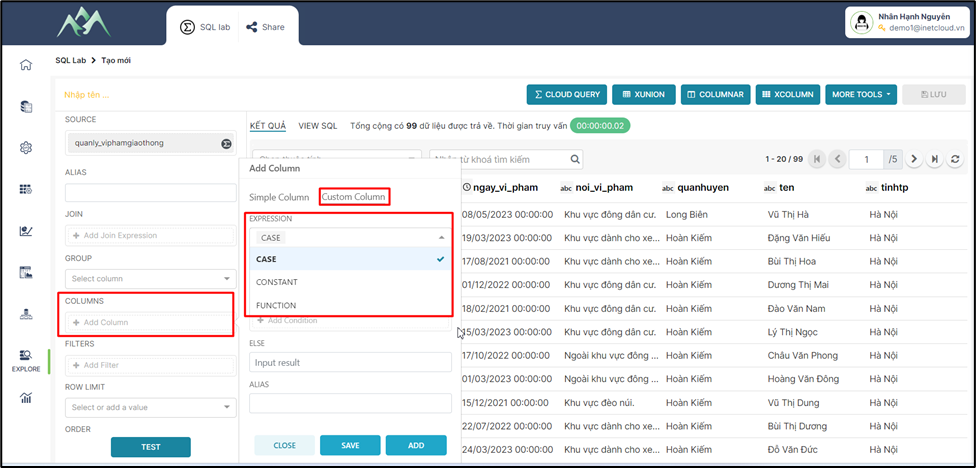
<span style="mso-no-proof: yes;">![](https://book.inetcloud.vn/uploads/images/gallery/2024-07/embedded-image-sxkvarsf.png)  
</span>

<span style="mso-fareast-font-family: 'Times New Roman';"><span style="mso-list: Ignore;">-<span style="font: 7.0pt 'Times New Roman';"> </span></span></span>Bước 2: Chọn kiểu dữ liệu cho cột/trường dữ liệu mới.
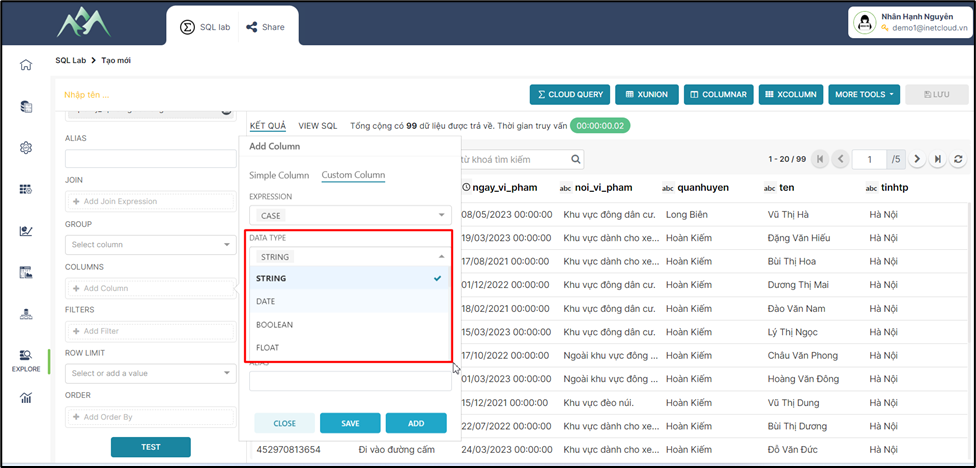
<span style="mso-no-proof: yes;">![](https://book.inetcloud.vn/uploads/images/gallery/2024-07/embedded-image-28ebtz4p.png)  
</span>

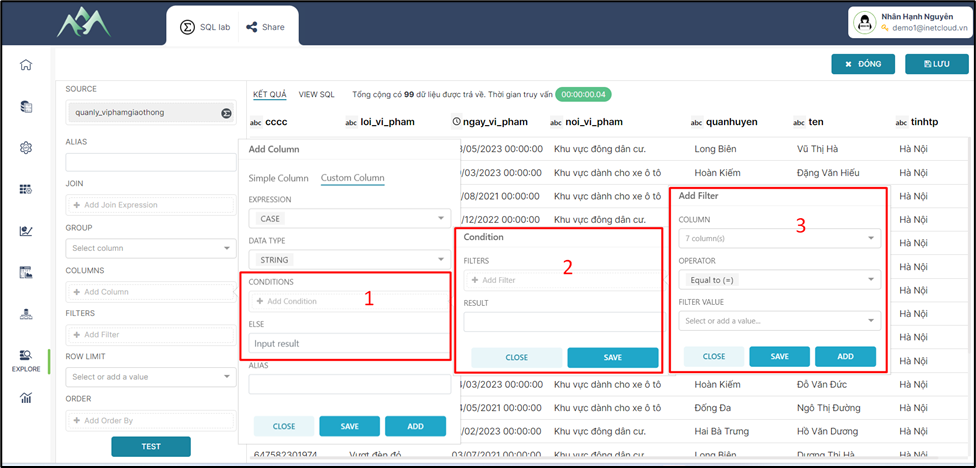
<span style="mso-fareast-font-family: 'Times New Roman';"><span style="mso-list: Ignore;">-<span style="font: 7.0pt 'Times New Roman';"> </span></span></span>Bước 3: Cấu hình điều kiện để lấy dữ liệu cho cột/trường dữ liệu mới.
<span style="mso-no-proof: yes;">![](https://book.inetcloud.vn/uploads/images/gallery/2024-07/embedded-image-1k29tlpl.png)  
</span>

Trong đó:

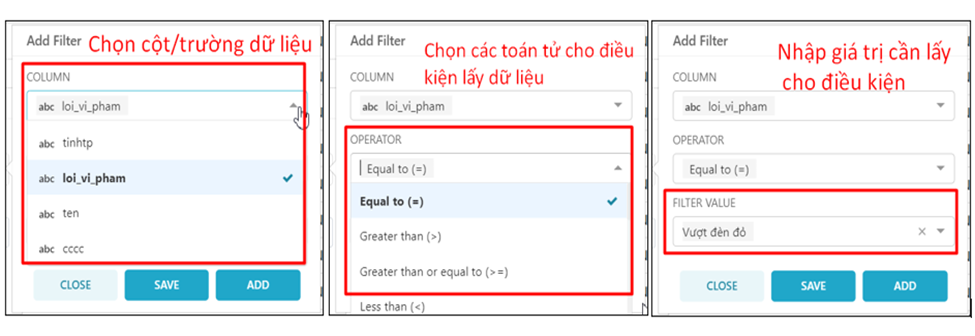
<span style="font-family: 'Courier New'; mso-fareast-font-family: 'Courier New';"><span style="mso-list: Ignore;">o<span style="font: 7.0pt 'Times New Roman';"> </span></span></span>Bảng Add Filter (3): Cấu hình điều kiện lọc cho dữ liệu.
<span style="mso-no-proof: yes;">![](https://book.inetcloud.vn/uploads/images/gallery/2024-07/embedded-image-j7j61o3t.png)  
</span>

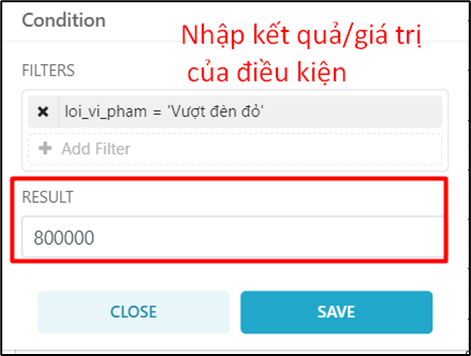
<span style="font-family: 'Courier New'; mso-fareast-font-family: 'Courier New';"><span style="mso-list: Ignore;">o<span style="font: 7.0pt 'Times New Roman';"> </span></span></span>Bảng Condition (2): Cấu hình giá trị tương ứng cho điều kiện lọc dữ liệu.
<span style="mso-no-proof: yes;">![](https://book.inetcloud.vn/uploads/images/gallery/2024-07/embedded-image-elupwl3c.png)  
</span>

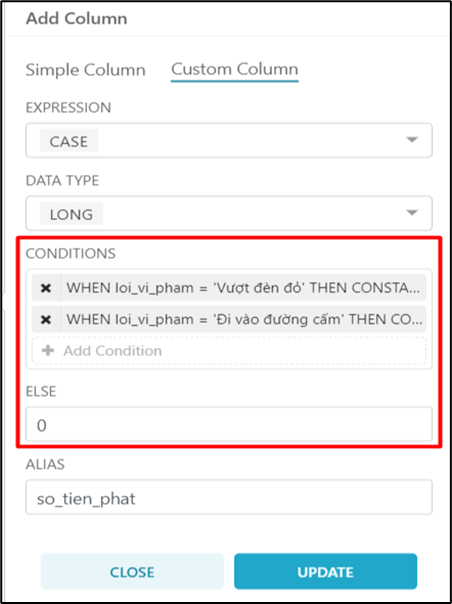
<span style="font-family: 'Courier New'; mso-fareast-font-family: 'Courier New';"><span style="mso-list: Ignore;">o<span style="font: 7.0pt 'Times New Roman';"> </span></span></span>Bảng CONDITIONS (1): Các điều kiện của cột/trường dữ liệu được tạo mới.
<span style="mso-no-proof: yes;">![](https://book.inetcloud.vn/uploads/images/gallery/2024-07/embedded-image-gv25iv01.png)  
</span>

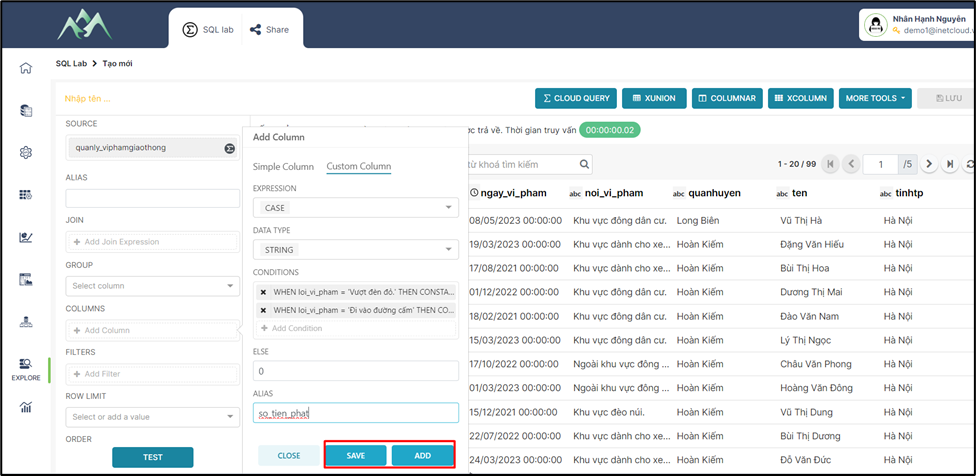
<span style="mso-fareast-font-family: 'Times New Roman';"><span style="mso-list: Ignore;">-<span style="font: 7.0pt 'Times New Roman';"> </span></span></span>Bước 4: Ấn ADD/SAVE để lưu cột dữ liệu vào tập dữ liệu hiện tại. Trong đó: ADD sẽ lưu và hiển thị lại giao diện để thực hiện thêm cột dữ liệu khác, SAVE sẽ lưu cột dữ liệu thêm mới và đóng bảng Add column.
<span style="mso-no-proof: yes;">![](https://book.inetcloud.vn/uploads/images/gallery/2024-07/embedded-image-wr1wymj4.png)  
</span>

<span style="mso-fareast-font-family: 'Times New Roman';"><span style="mso-list: Ignore;">-<span style="font: 7.0pt 'Times New Roman';"> </span></span></span>Bước 5: Ấn TEST để xem kết quả dữ liệu

<span style="mso-no-proof: yes;"></span>

<span style="mso-no-proof: yes;">![](https://book.inetcloud.vn/uploads/images/gallery/2024-07/embedded-image-3mcxjgpz.png)</span>

***<span style="mso-no-proof: yes;">Lưu ý: </span>****<span style="mso-no-proof: yes;">Để hiểu rõ hơn về các biểu thức có thể tham khảo thêm ở tài liệu này</span><span style="mso-no-proof: yes;"><span style="color: rgb(0, 0, 0);"> [https://book.inetcloud.vn/books/tai-lieu-su-dung-cloud-query/chapter/chuong-3-bieu-thuc](https://book.inetcloud.vn/books/tai-lieu-su-dung-cloud-query/chapter/chuong-3-bieu-thuc)</span></span>*

# 2.4. Thêm cột/trường dữ liệu mới với một giá trị cụ thể (Custom column - CONSTANT)

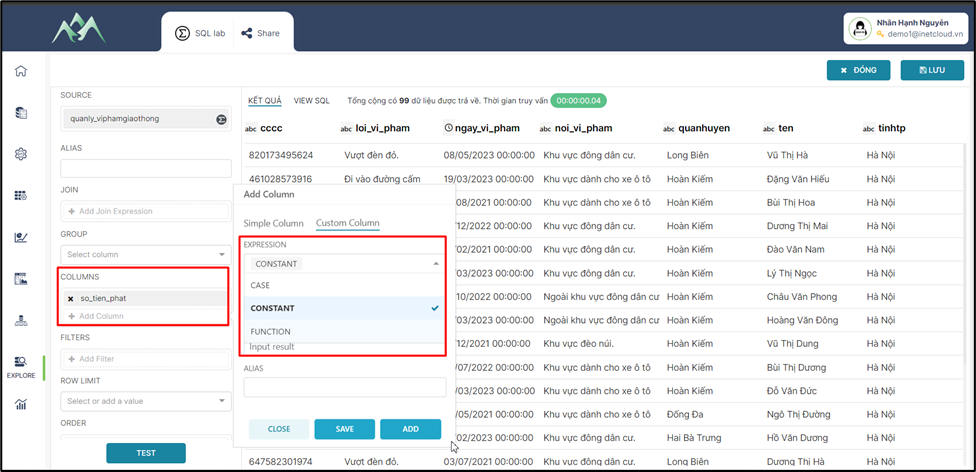
<span style="mso-fareast-font-family: 'Times New Roman';"><span style="mso-list: Ignore;">-<span style="font: 7.0pt 'Times New Roman';"> </span></span></span>Bước 1: Chọn biểu thức CONSTANT thực hiện thêm mới cột/trường dữ liệu.
<span style="mso-no-proof: yes;">![](https://book.inetcloud.vn/uploads/images/gallery/2024-07/embedded-image-0kveudam.png)  
</span>

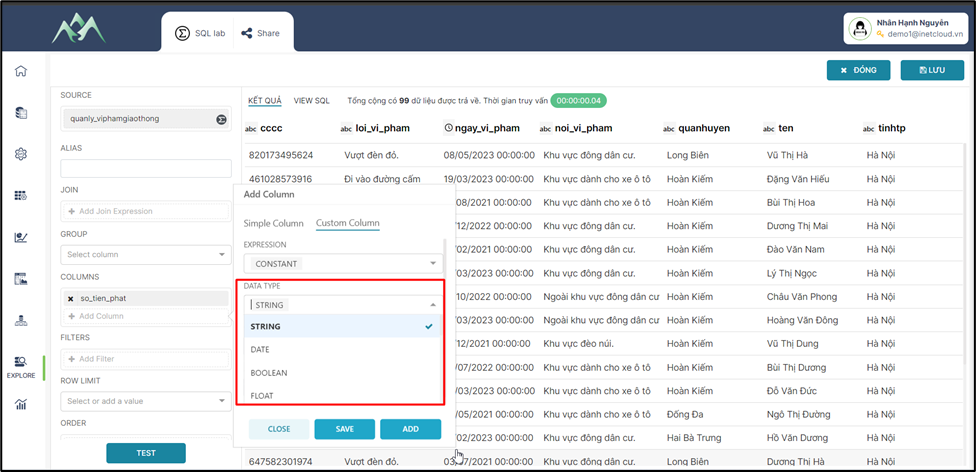
<span style="mso-fareast-font-family: 'Times New Roman';"><span style="mso-list: Ignore;">-<span style="font: 7.0pt 'Times New Roman';"> </span></span></span>Bước 2: Chọn kiểu dữ liệu cho cột/trường dữ liệu mới.
<span style="mso-no-proof: yes;">![](https://book.inetcloud.vn/uploads/images/gallery/2024-07/embedded-image-8sbtlzaa.png)  
</span>

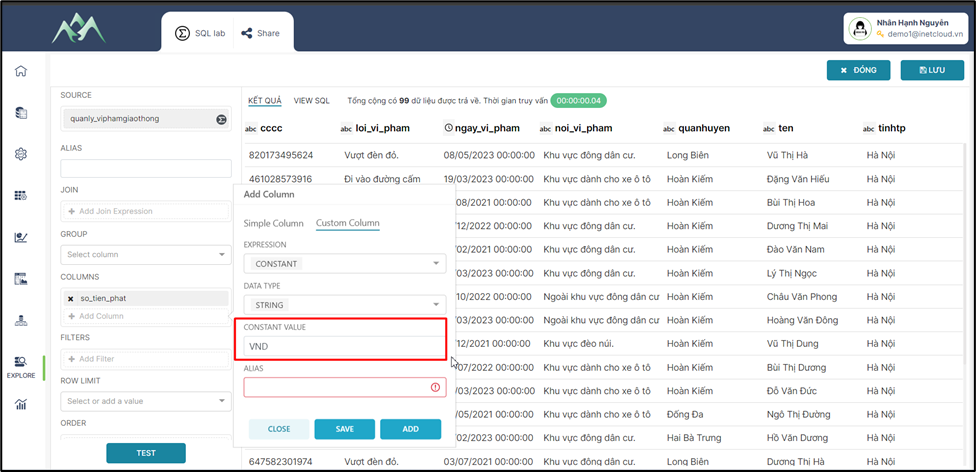
<span style="mso-fareast-font-family: 'Times New Roman';"><span style="mso-list: Ignore;">-<span style="font: 7.0pt 'Times New Roman';"> </span></span></span>Bước 3: Nhập giá trị cho cột/trường dữ liệu thêm mới.
<span style="mso-no-proof: yes;">![](https://book.inetcloud.vn/uploads/images/gallery/2024-07/embedded-image-2jbysfwh.png)  
</span>

<span style="mso-fareast-font-family: 'Times New Roman';"><span style="mso-list: Ignore;">-<span style="font: 7.0pt 'Times New Roman';"> </span></span></span>Bước 4: Nhập tên cho cột/trường dữ liệu thêm mới
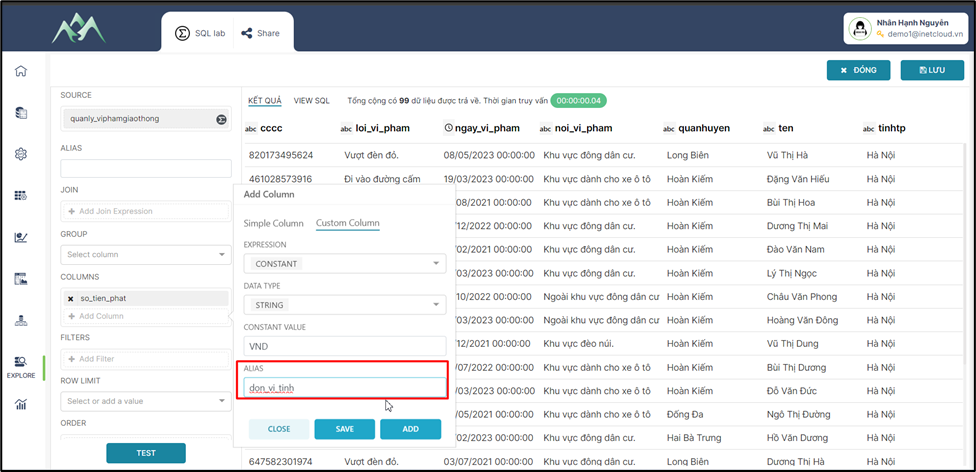
<span style="mso-no-proof: yes;">![](https://book.inetcloud.vn/uploads/images/gallery/2024-07/embedded-image-fglftgxn.png)  
</span>

<span style="mso-fareast-font-family: 'Times New Roman';"><span style="mso-list: Ignore;">-<span style="font: 7.0pt 'Times New Roman';"> </span></span></span>Bước 5: Ấn ADD/SAVE để lưu cột dữ liệu vào tập dữ liệu hiện tại. Trong đó: ADD sẽ lưu và hiển thị lại giao diện để thực hiện thêm cột dữ liệu khác, SAVE sẽ lưu cột dữ liệu thêm mới và đóng bảng Add column.
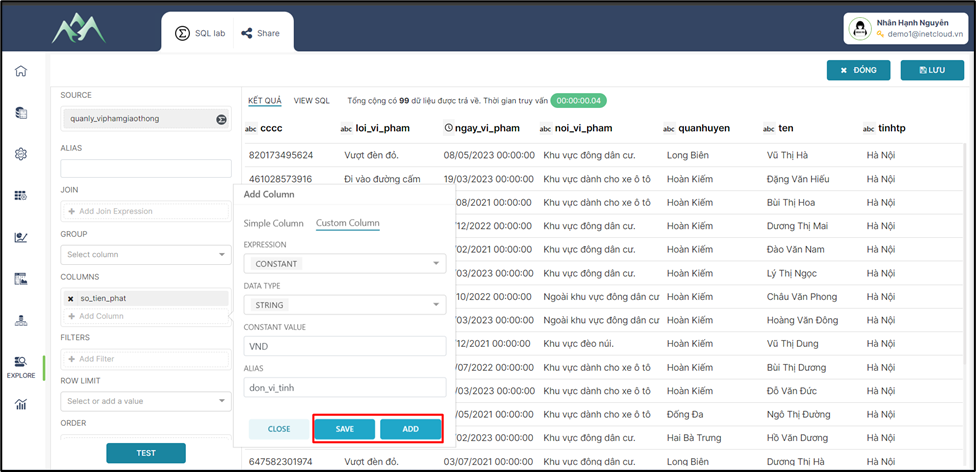
<span style="mso-no-proof: yes;">![](https://book.inetcloud.vn/uploads/images/gallery/2024-07/embedded-image-ztv29ofq.png)  
</span>

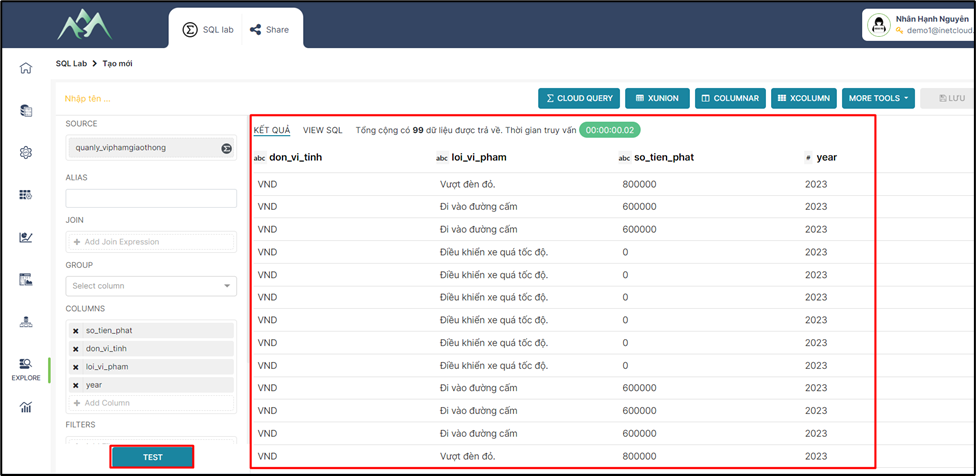
<span style="mso-fareast-font-family: 'Times New Roman';"><span style="mso-list: Ignore;">-<span style="font: 7.0pt 'Times New Roman';"> </span></span></span>Bước 6: Ấn TEST để xem kết quả dữ liệu.
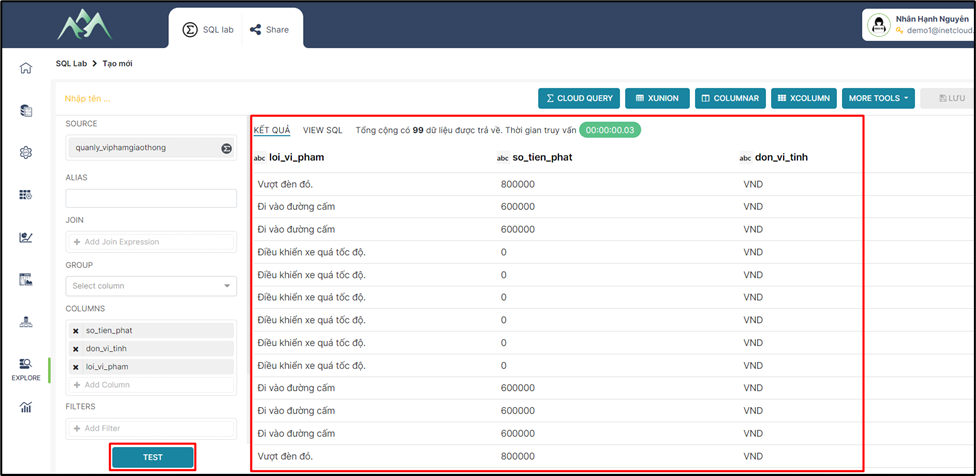
<span style="mso-no-proof: yes;">![](https://book.inetcloud.vn/uploads/images/gallery/2024-07/embedded-image-kcywfkkl.png)  
</span>

# 2.5. Thêm cột/trường dữ liệu mới với một giá trị cụ thể (Custom column -  FUNCTION)

<span style="mso-fareast-font-family: 'Times New Roman';"><span style="mso-list: Ignore;">-<span style="font: 7.0pt 'Times New Roman';"> </span></span></span>Bước 1: Chọn biểu thức FUNCTION thực hiện thêm mới cột/trường dữ liệu.
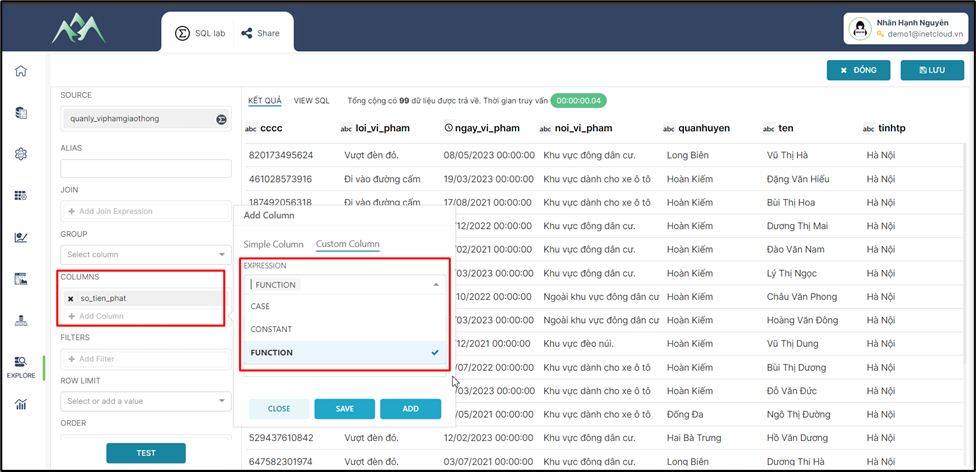
<span style="mso-no-proof: yes;">![](https://book.inetcloud.vn/uploads/images/gallery/2024-07/embedded-image-uynw2rlf.png)  
</span>

<span style="mso-fareast-font-family: 'Times New Roman';"><span style="mso-list: Ignore;">-<span style="font: 7.0pt 'Times New Roman';"> </span></span></span>Bước 2: Chọn kiểu dữ liệu cho cột/trường dữ liệu mới.
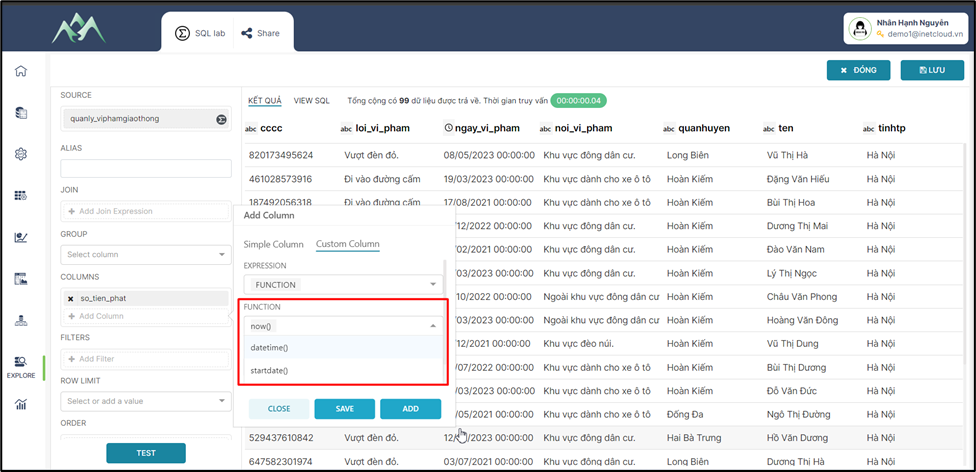
<span style="mso-no-proof: yes;">![](https://book.inetcloud.vn/uploads/images/gallery/2024-07/embedded-image-u7f3sbts.png)  
</span>

<span style="mso-fareast-font-family: 'Times New Roman';"><span style="mso-list: Ignore;">-<span style="font: 7.0pt 'Times New Roman';"> </span></span></span>Bước 3: Chọn hàm/thuật toán để lấy dữ liệu cho cột/trường dữ liệu mới.
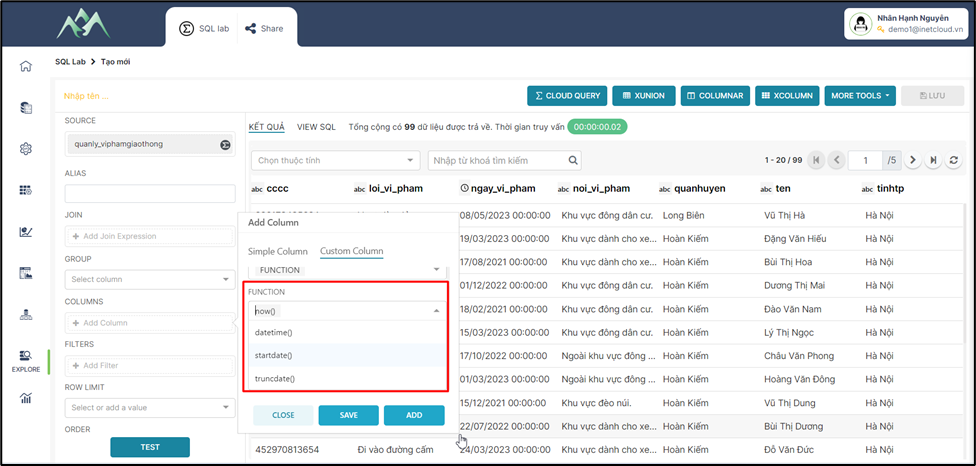
<span style="mso-no-proof: yes;">![](https://book.inetcloud.vn/uploads/images/gallery/2024-07/embedded-image-vy8cfpik.png)  
</span>

Trong đó:

<span style="font-family: 'Courier New'; mso-fareast-font-family: 'Courier New';"><span style="mso-list: Ignore;">o<span style="font: 7.0pt 'Times New Roman';"> </span></span></span>Hàm now(): Dữ liệu được trả về ngày và giờ hiện tại của hệ thống tại thời điểm thực hiện.
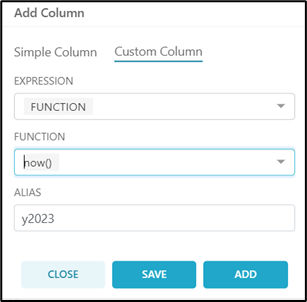
<span style="mso-no-proof: yes;">![](https://book.inetcloud.vn/uploads/images/gallery/2024-07/embedded-image-nqmdnw5g.png)  
</span>

<span style="font-family: 'Courier New'; mso-fareast-font-family: 'Courier New';"><span style="mso-list: Ignore;">o<span style="font: 7.0pt 'Times New Roman';"> </span></span></span>Hàm datetime(): Dữ liệu được trả về lấy ngày và giờ hiện tại hoặc để định dạng lại một giá trị ngày giờ.
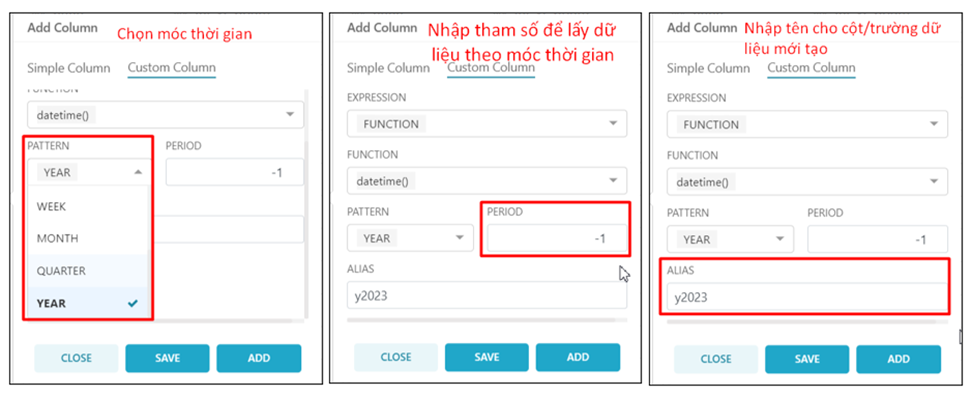
<span style="mso-no-proof: yes;">![](https://book.inetcloud.vn/uploads/images/gallery/2024-07/embedded-image-lcf6yy7h.png)  
</span>

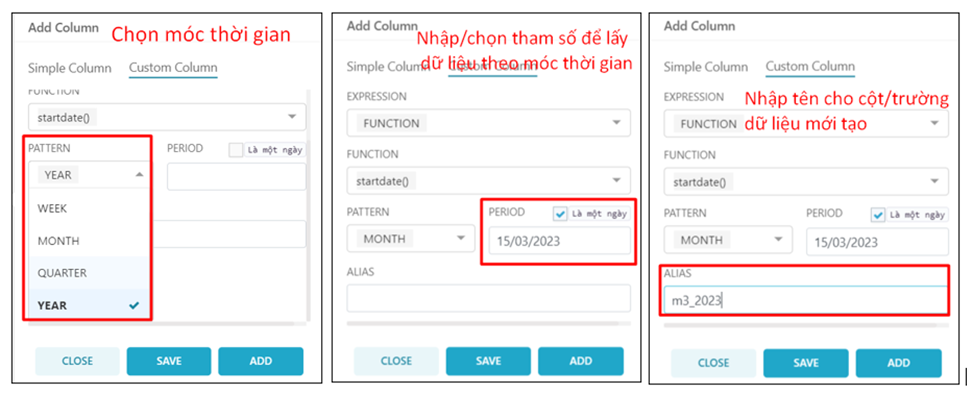
<span style="font-family: 'Courier New'; mso-fareast-font-family: 'Courier New';"><span style="mso-list: Ignore;">o<span style="font: 7.0pt 'Times New Roman';"> </span></span></span>Hàm startdate(): Sử dụng các hàm tích hợp sẵn trong các hệ CSDL để lấy ngày bắt đầu của các khoảng thời gian khác nhau.
<span style="mso-no-proof: yes;">![](https://book.inetcloud.vn/uploads/images/gallery/2024-07/embedded-image-rmmzrqqg.png)  
</span>

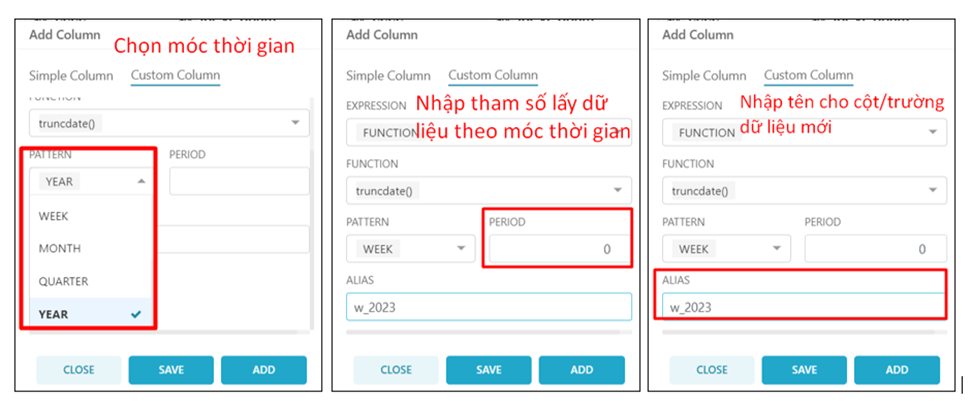
<span style="font-family: 'Courier New'; mso-fareast-font-family: 'Courier New';"><span style="mso-list: Ignore;">o<span style="font: 7.0pt 'Times New Roman';"> </span></span></span>Hàm truncdate(): Sử dụng các hàm có sẵn trong từng hệ quản trị CSDL để trích xuất ngày đầu tiên của tháng hoặc năm từ một ngày nhất định.
<span style="mso-no-proof: yes;">![](https://book.inetcloud.vn/uploads/images/gallery/2024-07/embedded-image-lx0vo2dv.png)  
</span>

<span style="color: rgb(0, 0, 0);">Chi tiết các hàm có thể xem ở tài liệu theo đường dẫn: <span style="color: rgb(35, 111, 161);">[https://book.inetcloud.vn/books/tai-lieu-su-dung-cloud-query/chapter/chuong-3-bieu-thuc](https://book.inetcloud.vn/books/tai-lieu-su-dung-cloud-query/chapter/chuong-3-bieu-thuc)</span></span>

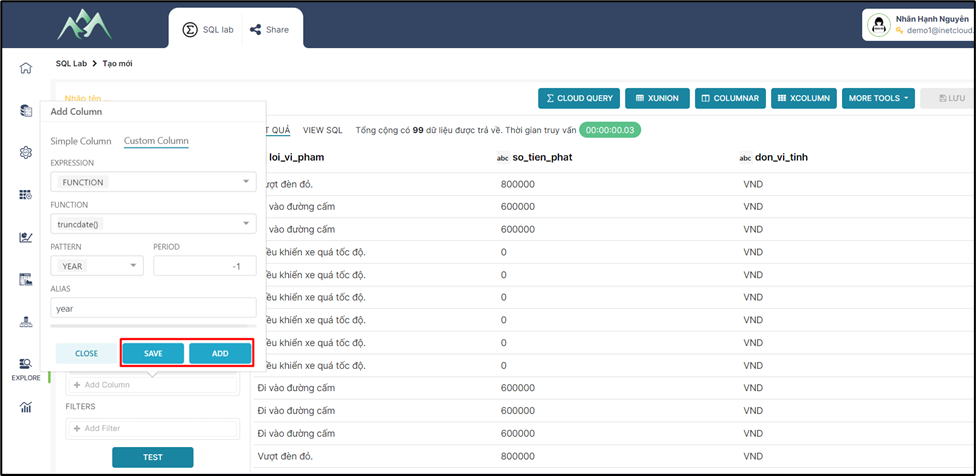
<span style="mso-fareast-font-family: 'Times New Roman';"><span style="mso-list: Ignore;">-<span style="font: 7.0pt 'Times New Roman';"> </span></span></span>Bước 4: Ấn ADD/SAVE để lưu cột dữ liệu vào tập dữ liệu hiện tại. Trong đó: ADD sẽ lưu và hiển thị lại giao diện để thực hiện thêm cột dữ liệu khác, SAVE sẽ lưu cột dữ liệu thêm mới và đóng bảng Add column.
<span style="mso-no-proof: yes;">![](https://book.inetcloud.vn/uploads/images/gallery/2024-07/embedded-image-hq2yt7it.png)  
</span>

<span style="mso-fareast-font-family: 'Times New Roman';"><span style="mso-list: Ignore;">-<span style="font: 7.0pt 'Times New Roman';"> </span></span></span>Bước 5: Ấn TEST để xem kết quả dữ liệu

<span style="mso-no-proof: yes;">![](https://book.inetcloud.vn/uploads/images/gallery/2024-07/embedded-image-ikdzmuud.png)  
</span>

<span style="mso-no-proof: yes;">  
</span>

<span style="mso-no-proof: yes;">  
</span>

# 2.6. Nhóm (GROUP) dữ liệu theo cột/trường thuộc tính

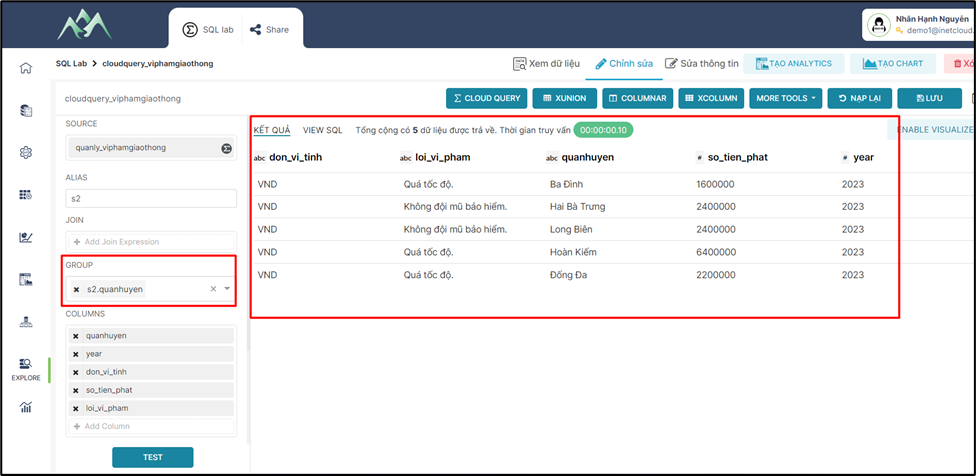
Mục tiêu của việc nhóm (GROUP) dữ liệu để nhóm các hàng có cùng một hoặc nhiều giá trị chung vào dùng một nhóm. Hàm GROUP này thường được sử dụng cùng với các hàm tổng hợp như COUNT, SUM, AVG, MAX, MIN. Thực hiện trên hệ thống theo các bước hướng dẫn sau:

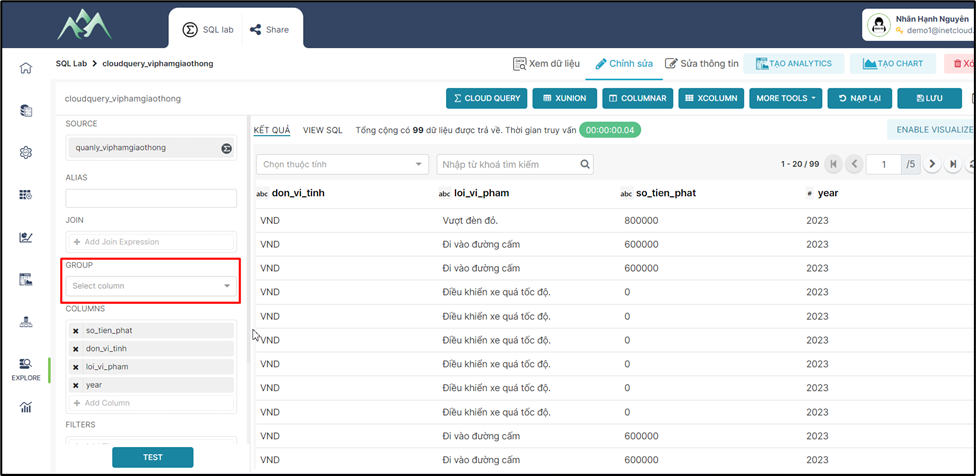
<span style="mso-fareast-font-family: 'Times New Roman';"><span style="mso-list: Ignore;">-<span style="font: 7.0pt 'Times New Roman';"> </span></span></span>Bước 1: Tại tập dữ liệu cần thực hiện nhóm dữ liệu, chọn các cột/trường thuộc tính
<span style="mso-no-proof: yes;">![](https://book.inetcloud.vn/uploads/images/gallery/2024-07/embedded-image-hqke5fa1.png)  
</span>

<span style="mso-fareast-font-family: 'Times New Roman';"><span style="mso-list: Ignore;">-<span style="font: 7.0pt 'Times New Roman';"> </span></span></span>Bước 2: Ấn TEST để xem kết quả nhóm dữ liệu
<span style="font-size: 13.0pt; mso-bidi-font-size: 11.0pt; line-height: 115%; font-family: 'Times New Roman',serif; mso-fareast-font-family: Calibri; mso-ansi-language: EN-US; mso-fareast-language: EN-US; mso-bidi-language: AR-SA; mso-no-proof: yes;">![](https://book.inetcloud.vn/uploads/images/gallery/2024-07/embedded-image-jn58ylmx.png)  
</span>

***Lưu ý:*** *Để hiểu rõ hơn về các biểu thức có thể tham khảo thêm ở tài liệu này [https://book.inetcloud.vn/books/tai-lieu-su-dung-cloud-query/page/25-group-by](https://book.inetcloud.vn/books/tai-lieu-su-dung-cloud-query/page/25-group-by)*

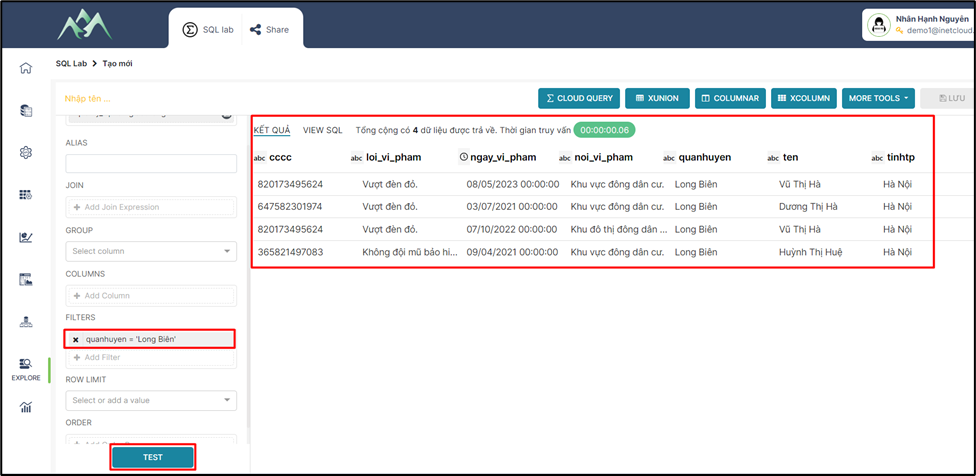
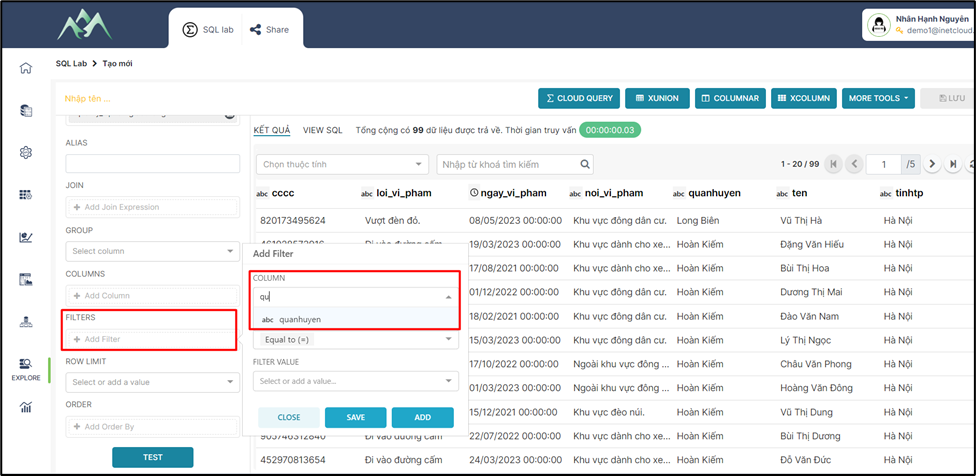
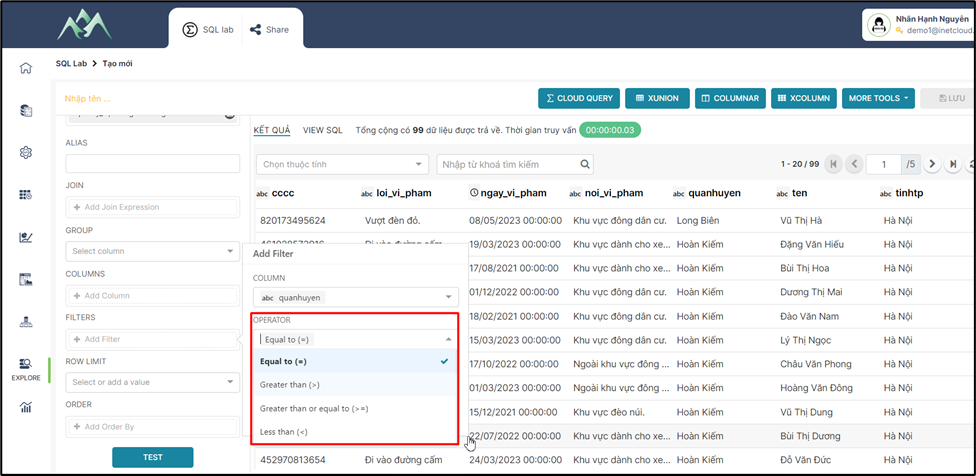
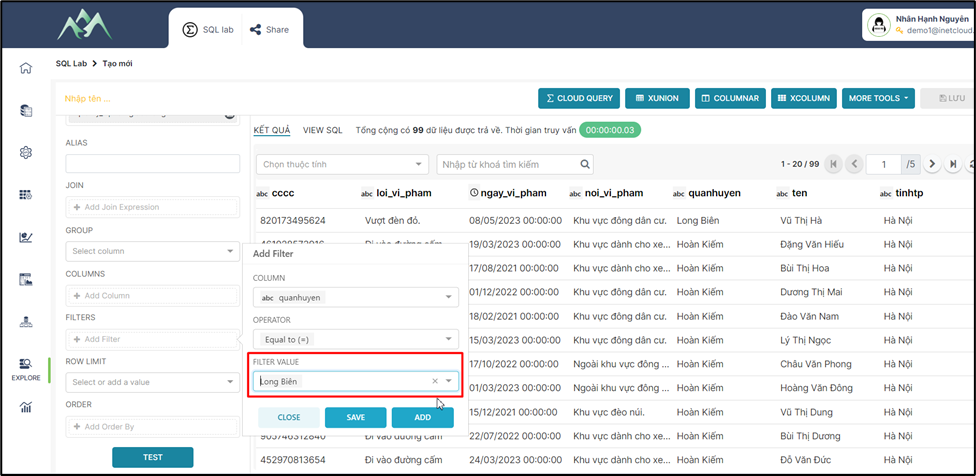
# 2.7. Cấu hình lọc (FILTER) dữ liệu theo điều kiện

<span style="mso-fareast-font-family: 'Times New Roman';"><span style="mso-list: Ignore;">-<span style="font: 7.0pt 'Times New Roman';"> </span></span></span>Bước 1: Tại tập dữ liệu chọn cột/trường dữ liệu làm điều kiện lọc
<span style="mso-no-proof: yes;">![](https://book.inetcloud.vn/uploads/images/gallery/2024-07/embedded-image-ldx1irwd.png)  
</span>

<span style="mso-fareast-font-family: 'Times New Roman';"><span style="mso-list: Ignore;">-<span style="font: 7.0pt 'Times New Roman';"> </span></span></span>Bước 2: Chọn các toán tử để cấu hình cho điều kiện lọc
<span style="mso-no-proof: yes;">![](https://book.inetcloud.vn/uploads/images/gallery/2024-07/embedded-image-sftfjyq2.png)  
</span>

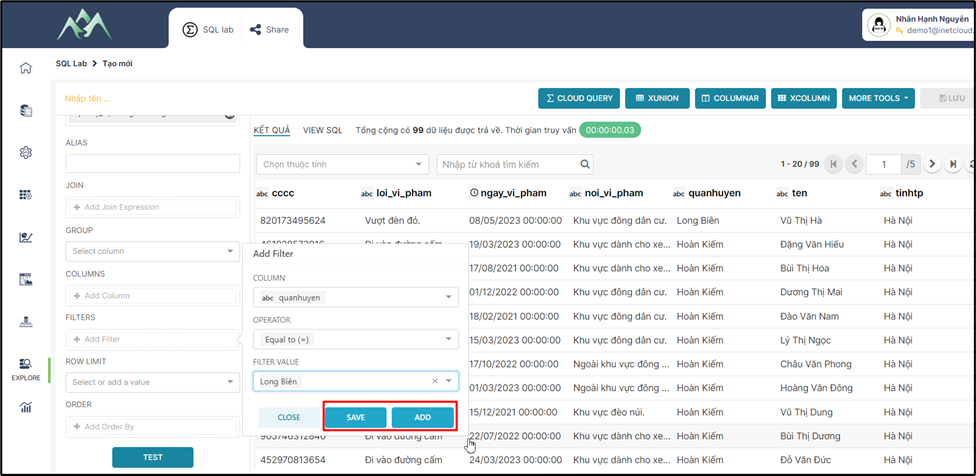
<span style="mso-fareast-font-family: 'Times New Roman';"><span style="mso-list: Ignore;">-<span style="font: 7.0pt 'Times New Roman';"> </span></span></span>Bước 3: Nhập giá trị cần lọc theo điều kiện
<span style="mso-no-proof: yes;">![](https://book.inetcloud.vn/uploads/images/gallery/2024-07/embedded-image-djtzq0mc.png)  
</span>

<span style="mso-fareast-font-family: 'Times New Roman';"><span style="mso-list: Ignore;">-<span style="font: 7.0pt 'Times New Roman';"> </span></span></span>Bước 4: Ấn ADD/SAVE để lưu cột dữ liệu vào tập dữ liệu hiện tại. Trong đó: ADD sẽ lưu và hiển thị lại giao diện để thực hiện thêm cột dữ liệu khác, SAVE sẽ lưu cột dữ liệu thêm mới và đóng bảng Add Filter.
<span style="mso-no-proof: yes;">![](https://book.inetcloud.vn/uploads/images/gallery/2024-07/embedded-image-bfwnoqtn.png)  
</span>

<span style="mso-fareast-font-family: 'Times New Roman';"><span style="mso-list: Ignore;">-<span style="font: 7.0pt 'Times New Roman';"> </span></span></span>Bước 5: Ấn TEST để xem kết quả dữ liệu

<span style="mso-no-proof: yes;">![](https://book.inetcloud.vn/uploads/images/gallery/2024-07/embedded-image-c6sajgqi.png)  
</span>

# 2.8. Cấu hình số lượng dòng hiển thị cho tập dữ liệu (ROW LIMIT)

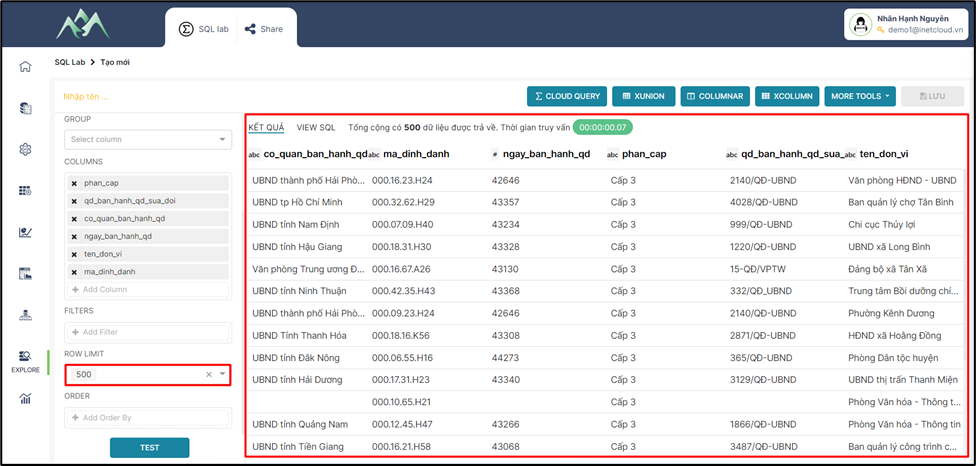
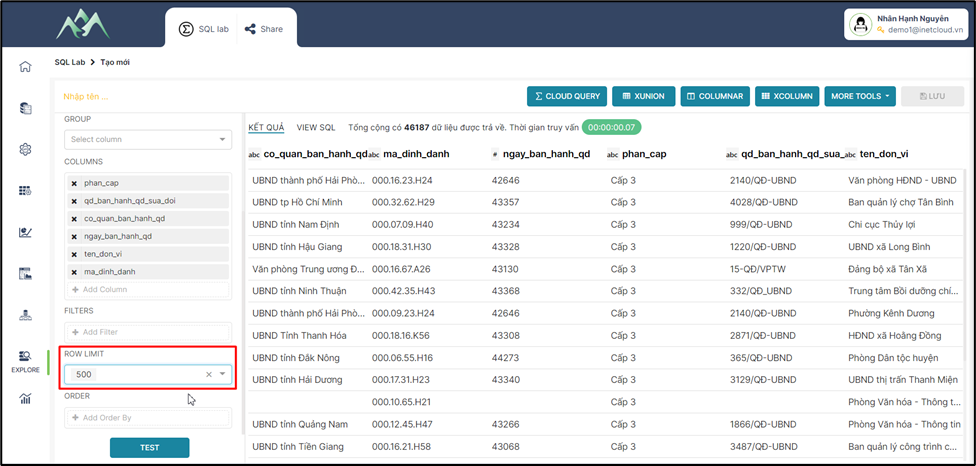
Mục tiêu: Giới hạn số lượng hàng (bản ghi) được trả về từ một truy vấn. Việc giới hạn số lượng hàng có thể hữu ích khi muốn lấy một số lượng nhỏ dữ liệu từ bảng lớn. Thực hiện trên hệ thống theo các bước hướng dẫn sau:

<span style="mso-fareast-font-family: 'Times New Roman';"><span style="mso-list: Ignore;">-<span style="font: 7.0pt 'Times New Roman';"> </span></span></span>Bước 1: Tại tập dữ liệu chọn hoặc nhập số lượng hàng dữ liệu cần xem
<span style="mso-no-proof: yes;">![](https://book.inetcloud.vn/uploads/images/gallery/2024-07/embedded-image-ooo11ocn.png)  
</span>

<span style="mso-fareast-font-family: 'Times New Roman';"><span style="mso-list: Ignore;">-<span style="font: 7.0pt 'Times New Roman';"> </span></span></span>Bước 2: Ấn TEST để xem kết quả dữ liệu

<span style="mso-no-proof: yes;">![](https://book.inetcloud.vn/uploads/images/gallery/2024-07/embedded-image-0gntf7z6.png)  
</span>

<span style="mso-no-proof: yes;">***Lưu ý:*** *Để hiểu rõ hơn về các biểu thức có thể tham khảo thêm ở tài liệu này [https://book.inetcloud.vn/books/tai-lieu-su-dung-cloud-query/page/27-limit](https://book.inetcloud.vn/books/tai-lieu-su-dung-cloud-query/page/27-limit)*</span>

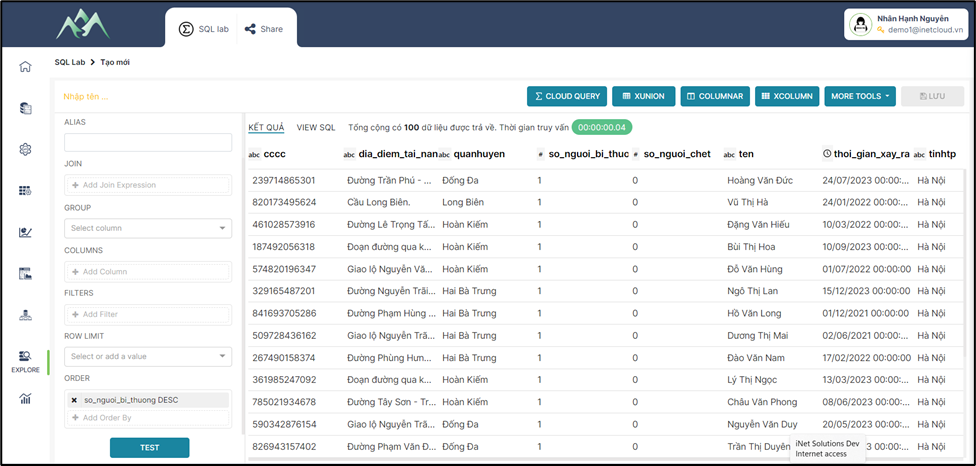
# 2.9. Cấu hình sắp xếp (ORDER) hiển thị dữ liệu

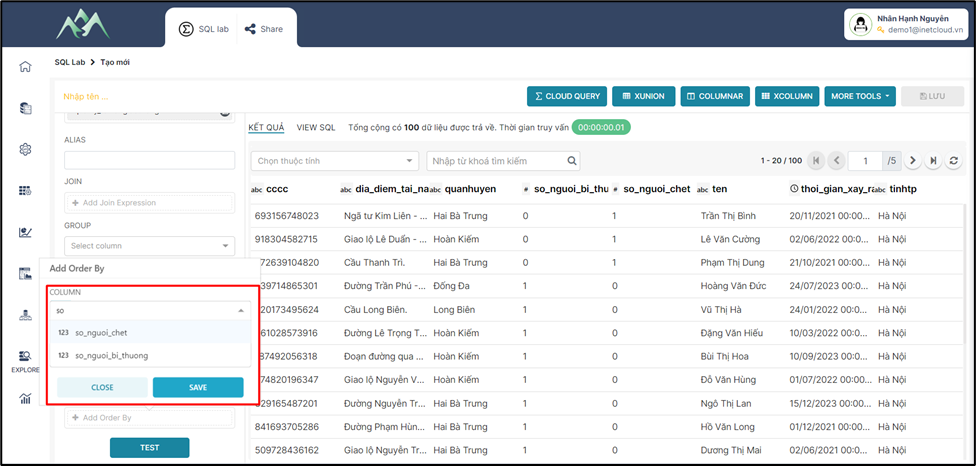
Mục tiêu: Sử dụng để sắp xếp các hàng (bản ghi) trả về từ một truy vấn theo một hoặc nhiều cột. Thực hiện trên hệ thống theo các bước hướng dẫn sau:

<span style="mso-fareast-font-family: 'Times New Roman';"><span style="mso-list: Ignore;">-<span style="font: 7.0pt 'Times New Roman';"> </span></span></span>Bước 1: Tại tập dữ liệu cột/trường dữ liệu cần sắp xếp
<span style="mso-no-proof: yes;">![](https://book.inetcloud.vn/uploads/images/gallery/2024-07/embedded-image-rgtyhrqf.png)  
</span>

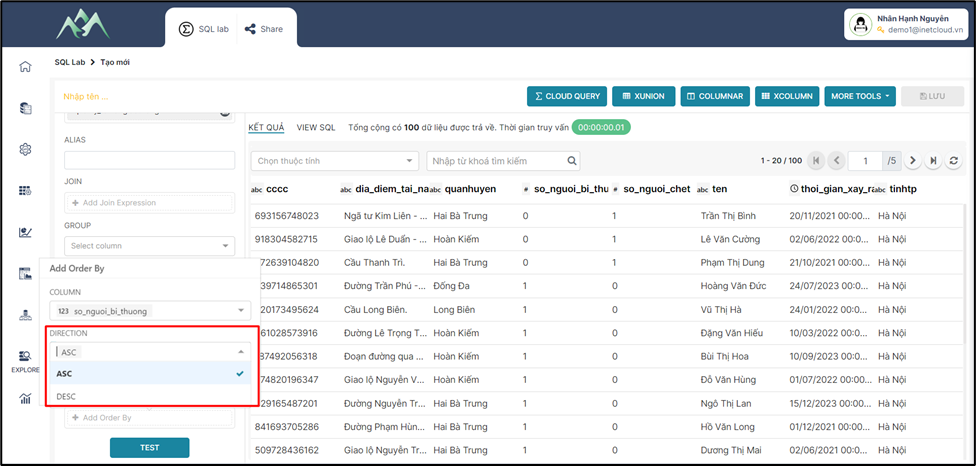
<span style="mso-fareast-font-family: 'Times New Roman';"><span style="mso-list: Ignore;">-<span style="font: 7.0pt 'Times New Roman';"> </span></span></span>Bước 2: Chọn hướng sắp xếp dữ liệu

<span style="mso-no-proof: yes;">![](https://book.inetcloud.vn/uploads/images/gallery/2024-07/embedded-image-5k3jygr2.png)  
</span>

<span style="mso-tab-count: 1;"> </span>Trong đó:

<span style="font-family: 'Courier New'; mso-fareast-font-family: 'Courier New';"><span style="mso-list: Ignore;">o<span style="font: 7.0pt 'Times New Roman';"> </span></span></span>ASC (Ascending): Thứ tự tăng dần

<span style="font-family: 'Courier New'; mso-fareast-font-family: 'Courier New';"><span style="mso-list: Ignore;">o<span style="font: 7.0pt 'Times New Roman';"> </span></span></span>**DESC (Descending)**: Thứ tự giảm dần.

<span style="mso-fareast-font-family: 'Times New Roman';"><span style="mso-list: Ignore;">-<span style="font: 7.0pt 'Times New Roman';"> </span></span></span>Bước 3: Ấn TEST để xem kết quả dữ liệu

<span style="mso-no-proof: yes;">![](https://book.inetcloud.vn/uploads/images/gallery/2024-07/embedded-image-z7lzx5ug.png)  
</span>

<span style="mso-no-proof: yes;">***Lưu ý:*** *Để hiểu rõ hơn về các biểu thức có thể tham khảo thêm ở tài liệu này [https://book.inetcloud.vn/books/tai-lieu-su-dung-cloud-query/page/26-order-by](https://book.inetcloud.vn/books/tai-lieu-su-dung-cloud-query/page/26-order-by)*</span>