# 6.	COLUMNAR

Mục tiêu COLUMNAR: Chuyển dữ liệu từ định dạng "dòng" sang "cột".

# Thực hiện trên hệ thống theo các bước hướng dẫn sau:

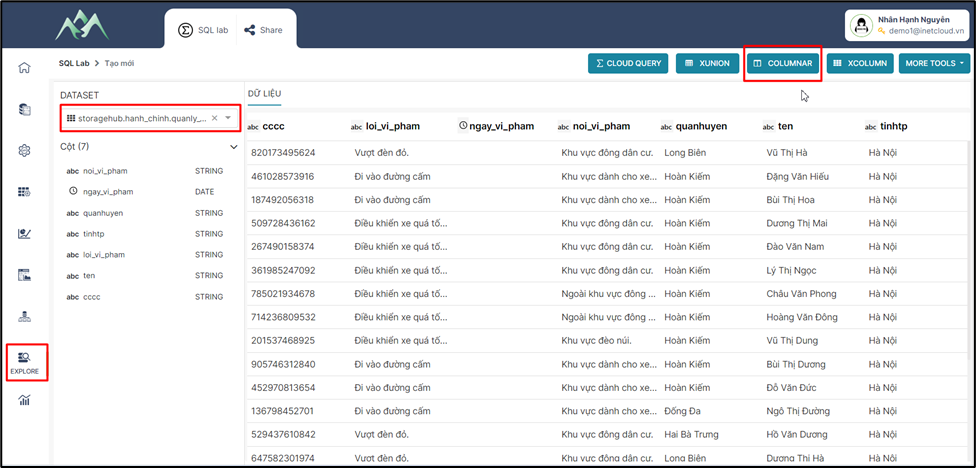
<span style="mso-fareast-font-family: 'Times New Roman';"><span style="mso-list: Ignore;">-<span style="font: 7.0pt 'Times New Roman';"> </span></span></span>Bước 1: Vào hệ thống chọn module Explore, chọn tập dữ liệu cần tổng hợp và tạo mới một tập dữ liệu tổng hợp từ COLUMNAR.
<span style="mso-no-proof: yes;">![](https://book.inetcloud.vn/uploads/images/gallery/2024-07/embedded-image-xklvgwjx.png)  
</span>

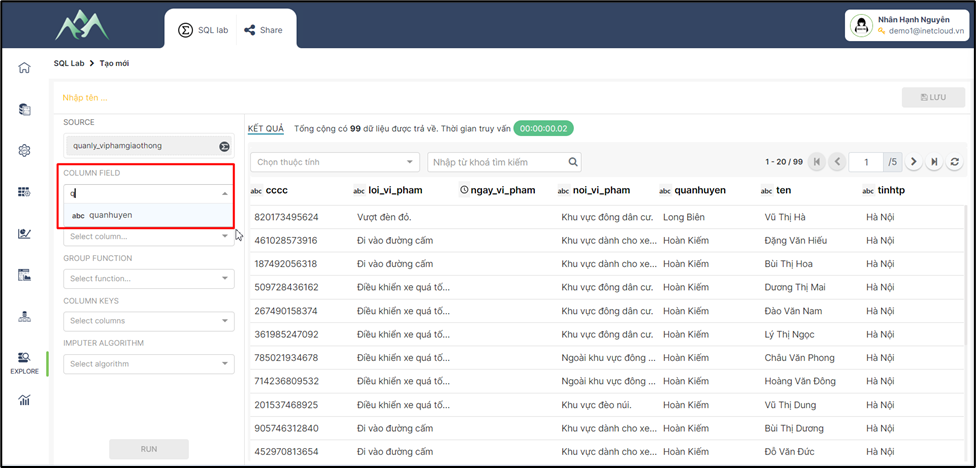
<span style="mso-fareast-font-family: 'Times New Roman';"><span style="mso-list: Ignore;">-<span style="font: 7.0pt 'Times New Roman';"> </span></span></span>Bước 2: “COLUMN FIELD” chọn cột dữ liệu cần định dạng "dòng" sang "cột".
<span style="mso-no-proof: yes;">![](https://book.inetcloud.vn/uploads/images/gallery/2024-07/embedded-image-lezzqbum.png)  
</span>

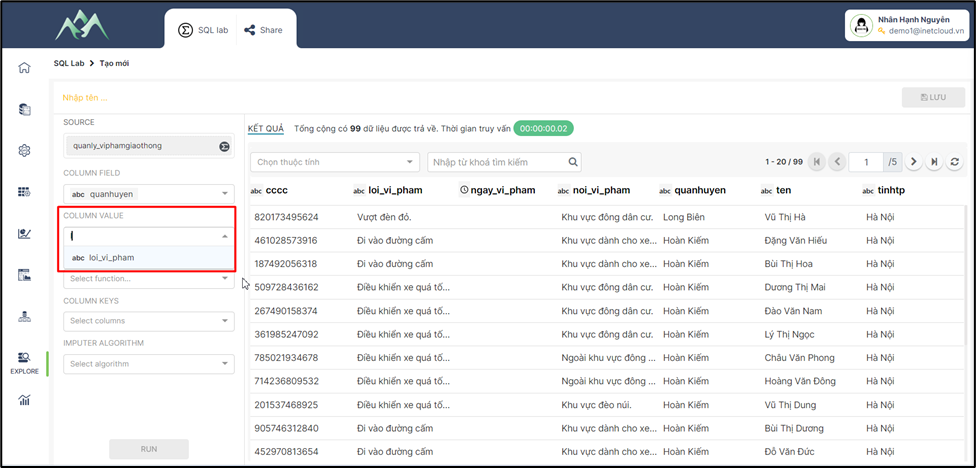
<span style="mso-fareast-font-family: 'Times New Roman';"><span style="mso-list: Ignore;">-<span style="font: 7.0pt 'Times New Roman';"> </span></span></span>Bước 3: “COLUMN VALUE” chọn giá trị cột cần tổng hợp
<span style="mso-no-proof: yes;">![](https://book.inetcloud.vn/uploads/images/gallery/2024-07/embedded-image-hnp0lbyp.png)  
</span>

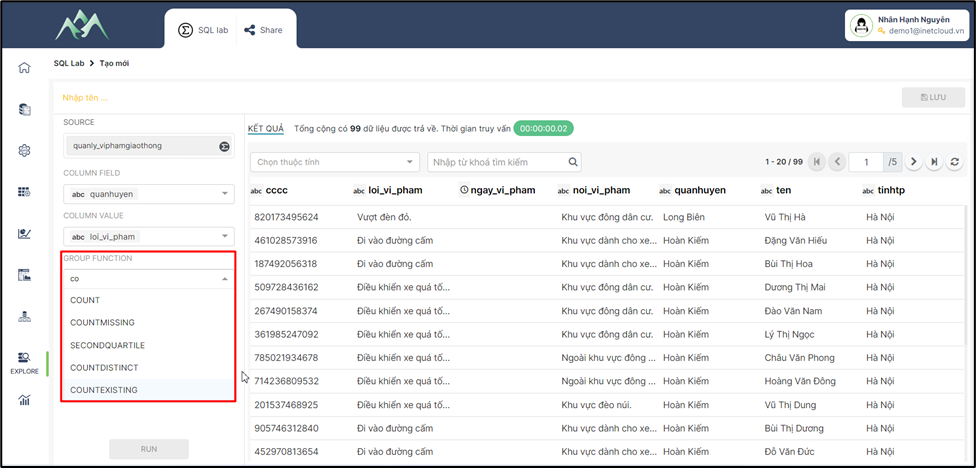
<span style="mso-fareast-font-family: 'Times New Roman';"><span style="mso-list: Ignore;">-<span style="font: 7.0pt 'Times New Roman';"> </span></span></span>Bước 4: “GROUP FUNCTION” chọn các hàm tính toán, xử lý dữ liệu cho cột giá trị cần tổng hợp.
<span style="mso-no-proof: yes;">![](https://book.inetcloud.vn/uploads/images/gallery/2024-07/embedded-image-csacpuj1.png)  
</span>

***Lưu ý:***

*<span style="color: red;">Để hiểu và sử dụng từng hàm có thể tham khảo tài liệu chi tiết theo đường dẫn: …</span>*

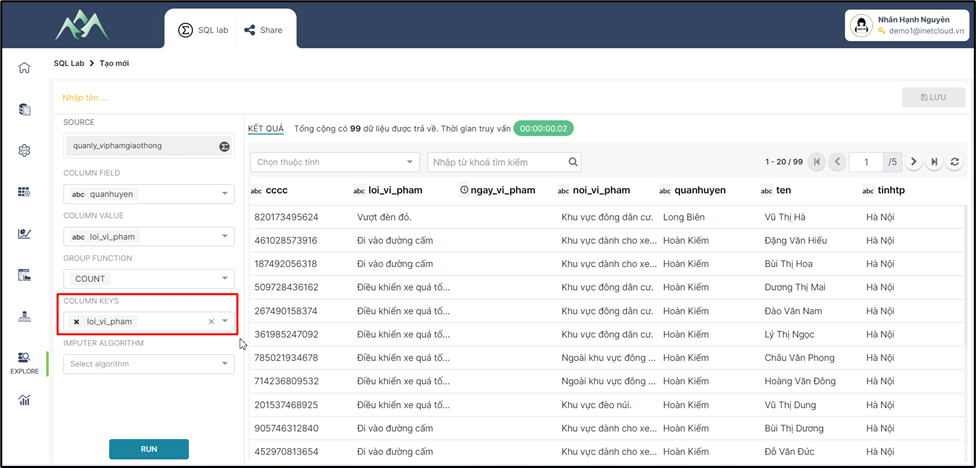
<span style="mso-fareast-font-family: 'Times New Roman';"><span style="mso-list: Ignore;">-<span style="font: 7.0pt 'Times New Roman';"> </span></span></span>Bước 5: “COLUMN KEYS” chọn cột trường thuộc tính là khóa xử lý
<span style="mso-spacerun: yes;"> </span><span style="mso-no-proof: yes;"></span>![](https://book.inetcloud.vn/uploads/images/gallery/2024-07/embedded-image-u7hhmftq.png)

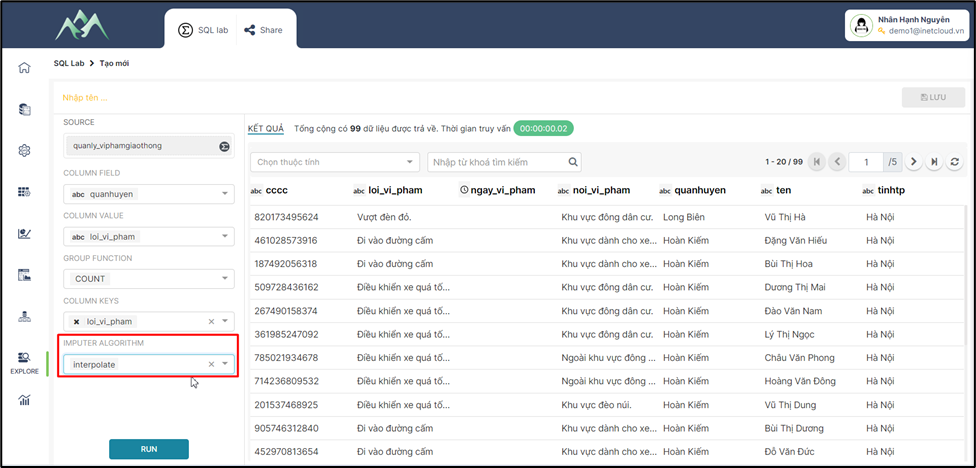
<span style="mso-fareast-font-family: 'Times New Roman';"><span style="mso-list: Ignore;">-<span style="font: 7.0pt 'Times New Roman';"> </span></span></span>Bước 6: “IMPUTER ALGORITHM” chọn thuật toán điền giá trị thiếu.
<span style="mso-no-proof: yes;">![](https://book.inetcloud.vn/uploads/images/gallery/2024-07/embedded-image-cnwoa1sr.png)  
</span>

Trong đó:

<span style="font-family: 'Courier New'; mso-fareast-font-family: 'Courier New';"><span style="mso-list: Ignore;">o<span style="font: 7.0pt 'Times New Roman';"> </span></span></span>Thuật toán nội suy (interpolation) được sử dụng để ước lượng giá trị tại các điểm trung gian dựa trên các giá trị đã biết của một tập dữ liệu.

<span style="font-family: 'Courier New'; mso-fareast-font-family: 'Courier New';"><span style="mso-list: Ignore;">o<span style="font: 7.0pt 'Times New Roman';"> </span></span></span>Thuật toán Simple được dùng để xử lý các bài toán như tìm kiếm tuyến tính, sắp xếp nổi bọt, hoặc tính giai thừa.

<span style="font-family: 'Courier New'; mso-fareast-font-family: 'Courier New';"><span style="mso-list: Ignore;">o<span style="font: 7.0pt 'Times New Roman';"> </span></span></span>Thuật toán KNN là một thuật toán dựa trên khoảng cách để phân loại hoặc dự đoán giá trị của một điểm dữ liệu mới dựa trên các điểm dữ liệu đã biết trong không gian đa chiều.

<span style="font-family: 'Courier New'; mso-fareast-font-family: 'Courier New';"><span style="mso-list: Ignore;">o<span style="font: 7.0pt 'Times New Roman';"> </span></span></span>Thuật toán Payesian là một trong những thuật toán phân loại phổ biến nhất trong học máy, đặc biệt là đối với các bài toán phân loại văn bản và lọc thư rác.

***Lưu ý:*** *<span style="color: red;">Để hiểu và sử dụng từng hàm có thể tham khảo tài liệu chi tiết theo đường dẫn: …</span>*

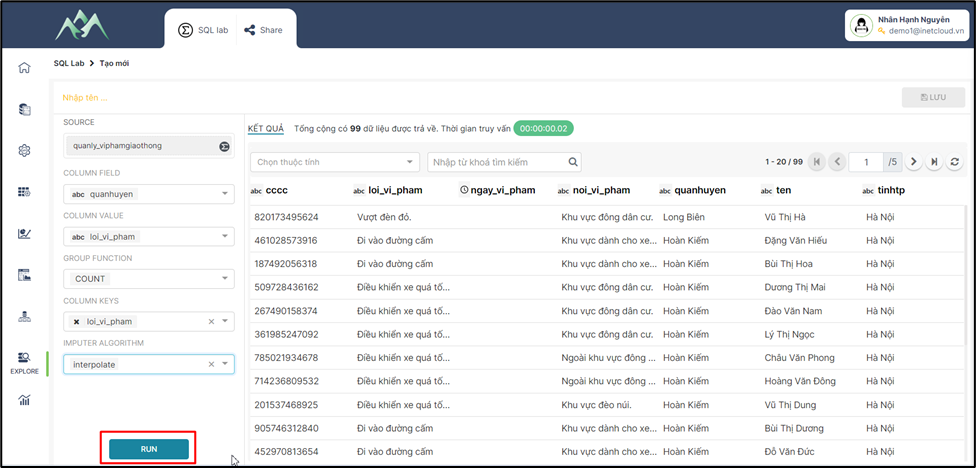
<span style="mso-fareast-font-family: 'Times New Roman';"><span style="mso-list: Ignore;">-<span style="font: 7.0pt 'Times New Roman';"> </span></span></span>Bước 7: Ấn RUN để xem kết quả dữ liệu thêm mới vào tập dữ liệu.
<span style="mso-no-proof: yes;">![](https://book.inetcloud.vn/uploads/images/gallery/2024-07/embedded-image-xx6zoehl.png)  
</span>

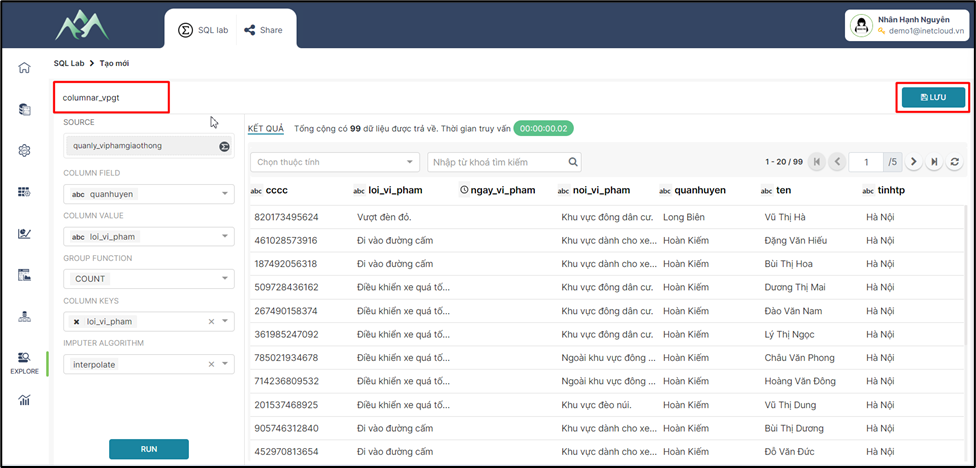
<span style="mso-fareast-font-family: 'Times New Roman';"><span style="mso-list: Ignore;">-<span style="font: 7.0pt 'Times New Roman';"> </span></span></span>Bước 8: Nhập tên cho tập dữ liệu mới được tổng hợp, chọn Lưu thông tin tập dữ liệu được tổng hợp bằng công cụ COLUMNAR
<span style="mso-no-proof: yes;">![](https://book.inetcloud.vn/uploads/images/gallery/2024-07/embedded-image-uqlhgiok.png)  
</span>