# 2.1. Nối các tập dữ liệu

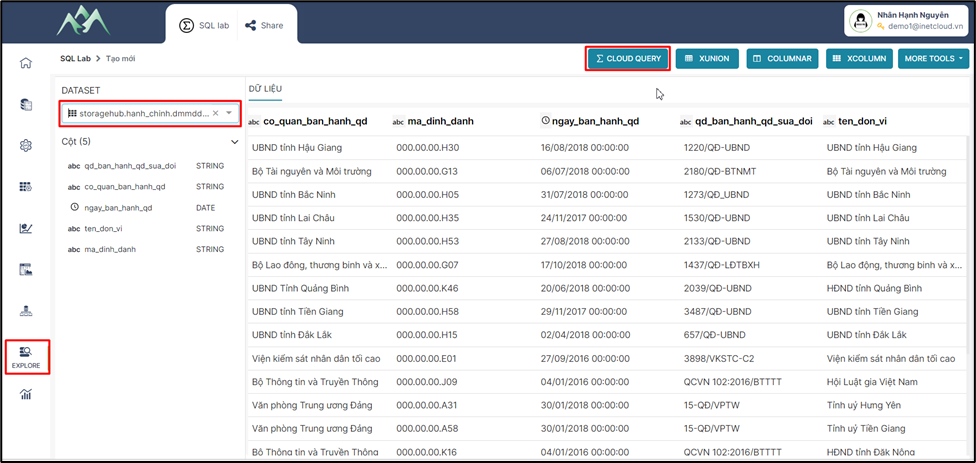
<span style="mso-fareast-font-family: 'Times New Roman';"><span style="mso-list: Ignore;">-<span style="font: 7.0pt 'Times New Roman';"> </span></span></span>Bước 1: Xác định tập dữ liệu đầu vào. Trên hệ thống chọn module Explore, chọn tập dữ liệu cần tổng hợp và chọn CLOUD QUERY.
<span style="mso-no-proof: yes;">![](https://book.inetcloud.vn/uploads/images/gallery/2024-07/embedded-image-znnxm7dg.png)  
</span>

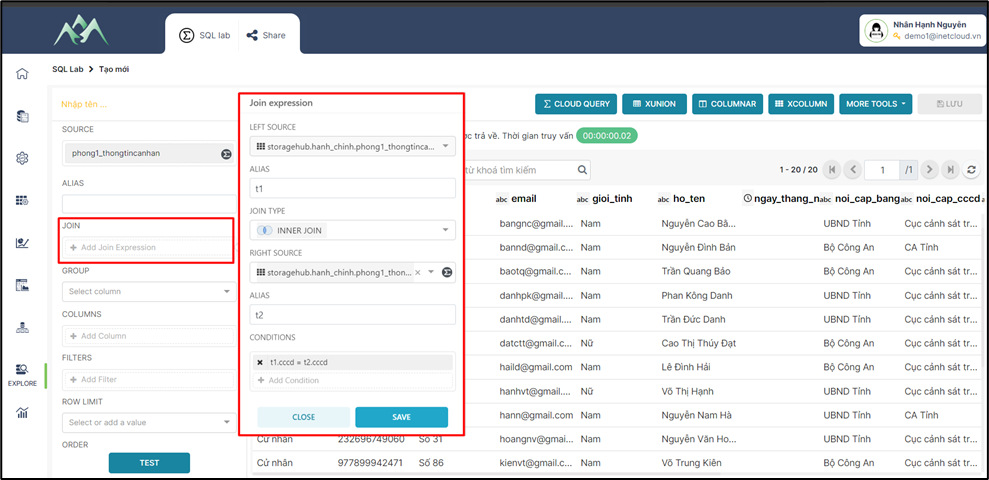
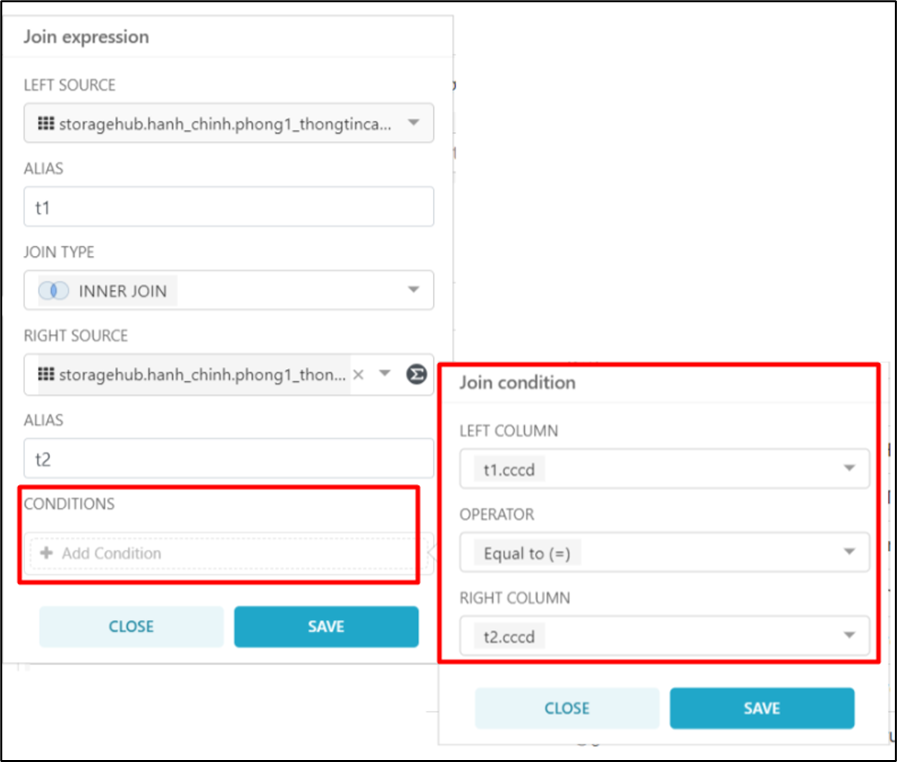
<span style="mso-fareast-font-family: 'Times New Roman';"><span style="mso-list: Ignore;">-<span style="font: 7.0pt 'Times New Roman';"> </span></span></span>Bước 2: Xác định tập dữ liệu cần tổng hợp với tập dữ liệu đầu vào. Cấu hình điều kiện nối các tập dữ liệu trên hệ thống.
<span style="mso-no-proof: yes;">![](https://book.inetcloud.vn/uploads/images/gallery/2024-07/embedded-image-lrlltvhr.png)  
</span>

Trong đó:

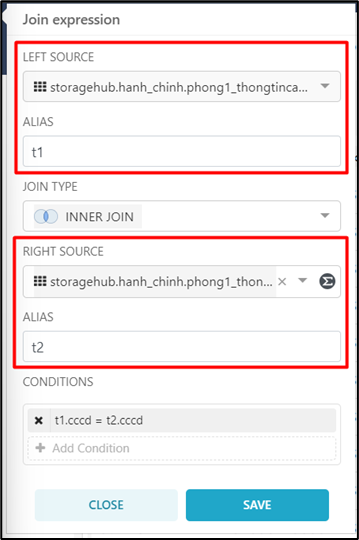
<span style="font-family: 'Courier New'; mso-fareast-font-family: 'Courier New';"><span style="mso-list: Ignore;">o<span style="font: 7.0pt 'Times New Roman';"> </span></span></span>LEFT SOURCE: Tập dữ liệu ban đầu (bảng 1) cần thực hiện kết nối với tập dữ liệu khác.

<span style="font-family: 'Courier New'; mso-fareast-font-family: 'Courier New';"><span style="mso-list: Ignore;">o<span style="font: 7.0pt 'Times New Roman';"> </span></span></span>ALIAS: Đặt tên liên kết cho các trường thuộc tính của tập dữ liệu ban đầu. Mục tiêu để sau khi nối các tập dữ liệu lại với nhau sẽ dễ phân biệt trường thuộc tính thuộc tập dữ liệu nào.
<span style="mso-no-proof: yes;">![](https://book.inetcloud.vn/uploads/images/gallery/2024-07/embedded-image-2ssh1jzl.png)  
</span>

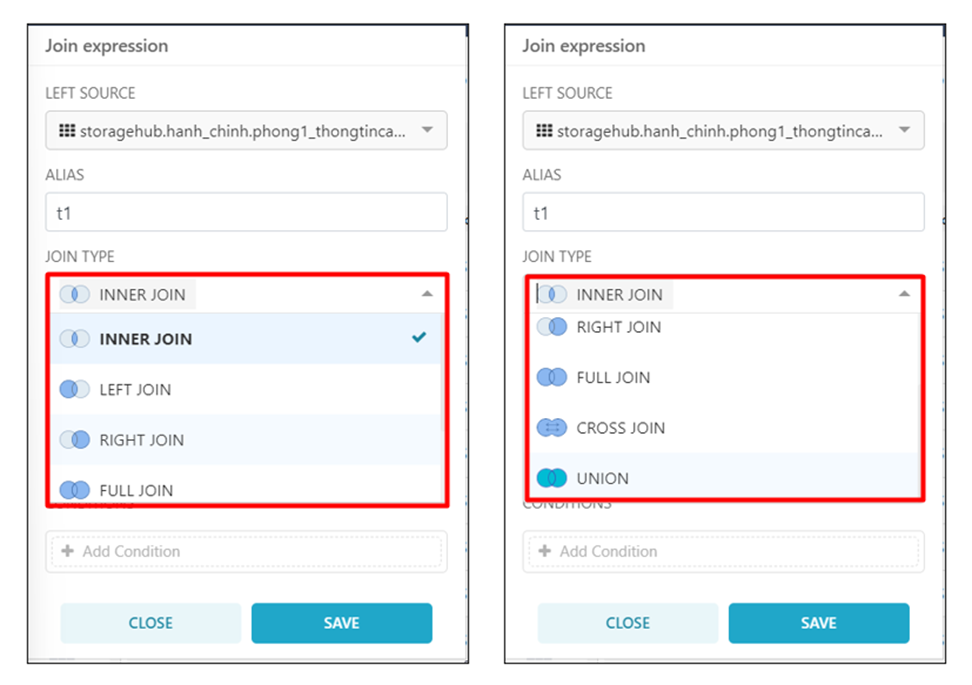
<span style="font-family: 'Courier New'; mso-fareast-font-family: 'Courier New'; mso-no-proof: yes;"><span style="mso-list: Ignore;">o<span style="font: 7.0pt 'Times New Roman';"> </span></span></span>JOIN TYPE: Chọn loại kế<span style="color: rgb(0, 0, 0);">t nối, chi tiết các loại kết nối có thể xem thêm tại "Tài liệu sử dụng Cloud query, đường dẫn [https://book.inetcloud.vn/books/tai-lieu-su-dung-cloud-query ](https://book.inetcloud.vn/books/tai-lieu-su-dung-cloud-query/page/23-joins)"</span>

<span style="mso-no-proof: yes;">![](https://book.inetcloud.vn/uploads/images/gallery/2024-07/embedded-image-bllx5up0.png)  
</span>

<span style="font-family: 'Courier New'; mso-fareast-font-family: 'Courier New';"><span style="mso-list: Ignore;">o<span style="font: 7.0pt 'Times New Roman';"> </span></span></span>RIGHT SOURCE: Chọn tập dữ liệu (bảng 2) nối với tập dữ liệu ban đầu (bảng 1).

<span style="font-family: 'Courier New'; mso-fareast-font-family: 'Courier New';"><span style="mso-list: Ignore;">o<span style="font: 7.0pt 'Times New Roman';"> </span></span></span>CONDITIONS: Chọn trường dữ liệu là điều kiện để nối các tập dữ liệu. Cột điều kiện hay còn gọi là khóa chính để tổng hợp các giá trị tương đồng giữa các tập dữ liệu.
<span style="mso-no-proof: yes;">![](https://book.inetcloud.vn/uploads/images/gallery/2024-07/embedded-image-i6n73umk.png)  
</span>

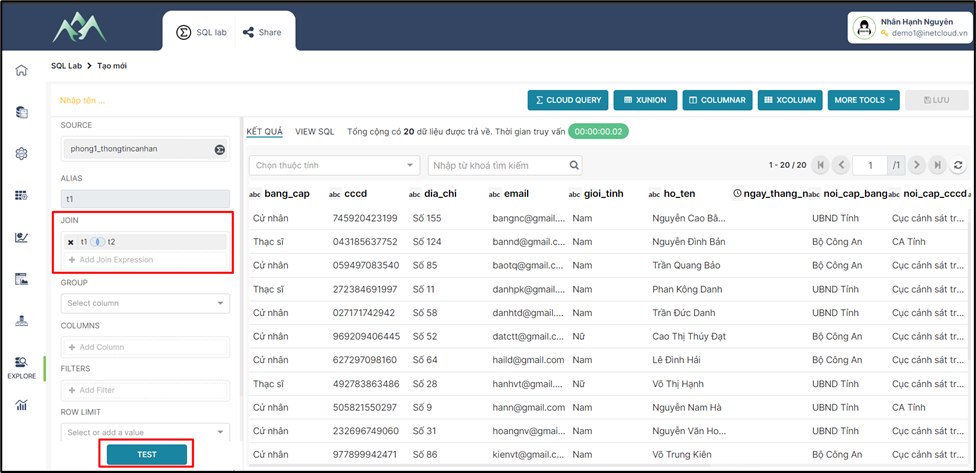
<span style="mso-fareast-font-family: 'Times New Roman';"><span style="mso-list: Ignore;">-<span style="font: 7.0pt 'Times New Roman';"> </span></span></span>Bước 3: Thực hiện kết hợp các bảng theo cột khóa . Trên hệ thống ấn TEST để xem kết quả dữ liệu được nối giữa các tập dữ liệu.
<span style="mso-no-proof: yes;">![](https://book.inetcloud.vn/uploads/images/gallery/2024-07/embedded-image-ba3rqrji.png)  
</span>

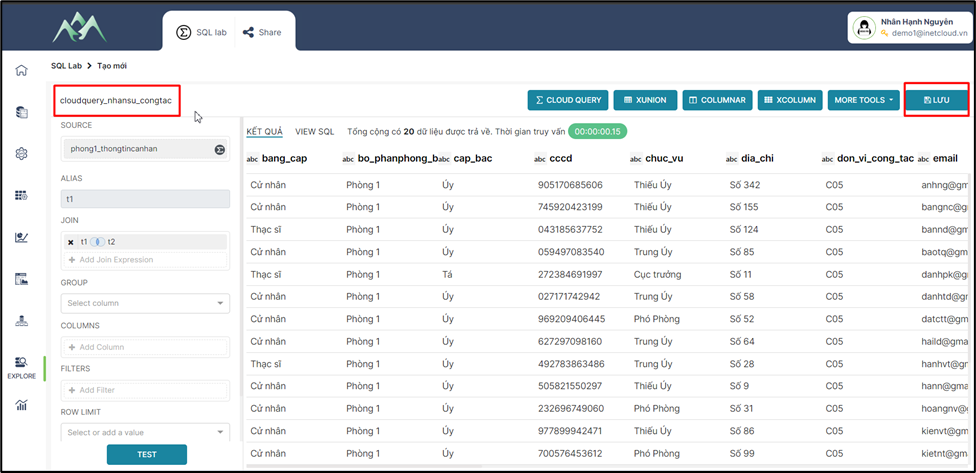
<span style="mso-fareast-font-family: 'Times New Roman';"><span style="mso-list: Ignore;">-<span style="font: 7.0pt 'Times New Roman';"> </span></span></span>Bước 4: Nhập tên cho tập dữ liệu mới được tổng hợp, chọn Lưu thông tin tập dữ liệu được tổng hợp bằng công cụ CLOUD QUERY.
<span style="mso-no-proof: yes;">![](https://book.inetcloud.vn/uploads/images/gallery/2024-07/embedded-image-lvd602c2.png)  
</span>

***Lưu ý****: Để xử lý các cột/trường dữ liệu xem hướng dẫn chi tiết tại mục 2.2*