# 2.2. Xử lý các cột/trường dữ liệu bằng các hàm, thuật toán (Simple column)

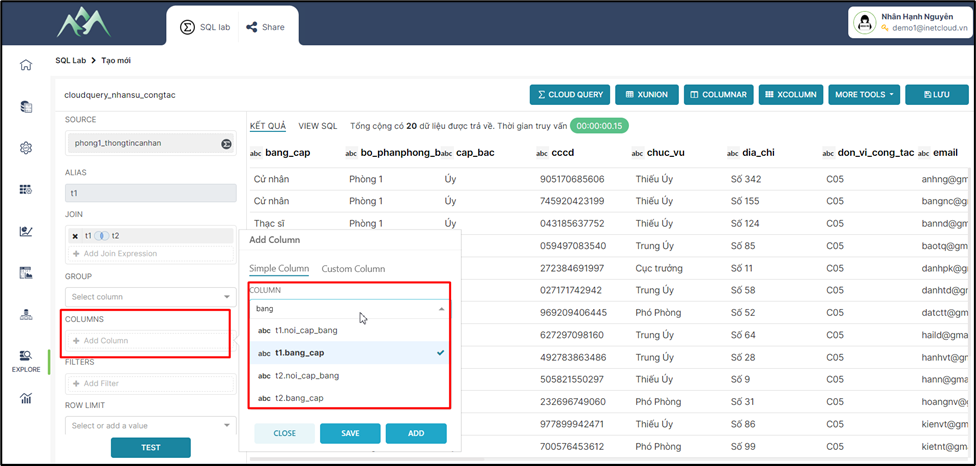
<span style="mso-fareast-font-family: 'Times New Roman';"><span style="mso-list: Ignore;">-<span style="font: 7.0pt 'Times New Roman';"> </span></span></span>Bước 1: Chọn các cột/trường dữ liệu cần cho tập dữ liệu
<span style="mso-no-proof: yes;">![](https://book.inetcloud.vn/uploads/images/gallery/2024-07/embedded-image-0s2ywpyi.png)  
</span>

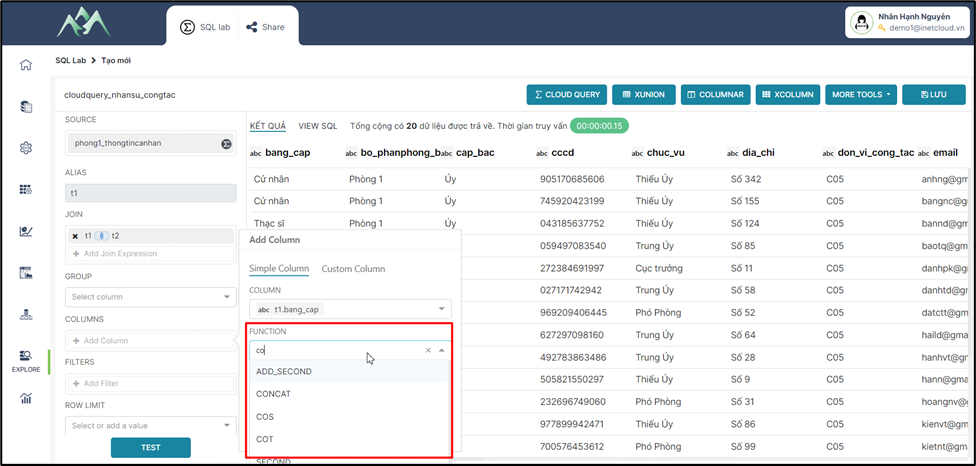
<span style="mso-fareast-font-family: 'Times New Roman';"><span style="mso-list: Ignore;">-<span style="font: 7.0pt 'Times New Roman';"> </span></span></span>Bước 2: Chọn hàm/thuật toán xử lý cột/trường dữ liệu được chọn
<span style="mso-no-proof: yes;">![](https://book.inetcloud.vn/uploads/images/gallery/2024-07/embedded-image-x2wteq2u.png)  
</span>

***Lưu ý****: <span style="color: rgb(0, 0, 0);">Xem tài liệu theo đường dẫn [https://book.inetcloud.vn/books/tai-lieu-su-dung-cloud-query/chapter/chuong-4-cac-ham-chuc-nang](https://book.inetcloud.vn/books/tai-lieu-su-dung-cloud-query/chapter/chuong-4-cac-ham-chuc-nang) này để chi tiết hơn về ý nghĩa và chức năng của các hàm/thuật toán cần sử dụng.</span>*

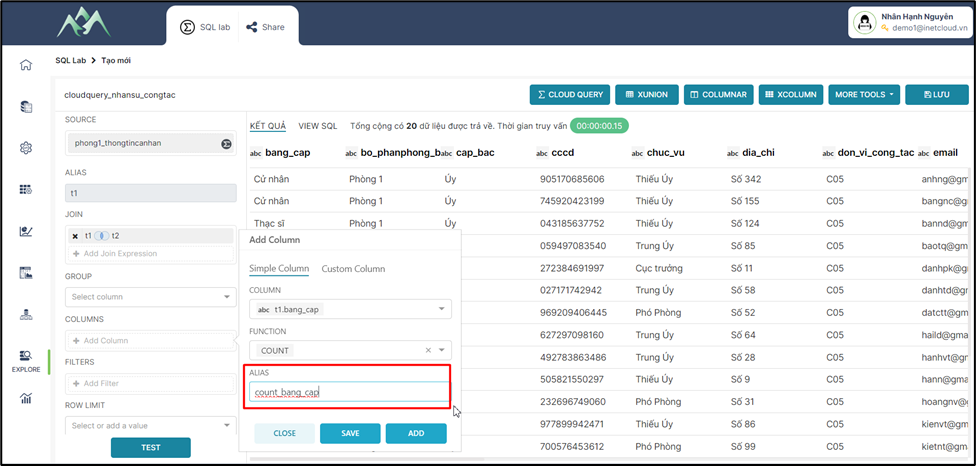
<span style="mso-fareast-font-family: 'Times New Roman';"><span style="mso-list: Ignore;">-<span style="font: 7.0pt 'Times New Roman';"> </span></span></span>Bước 3: Đặt tên mới cho cột/trường dữ liệu. Hệ thống sẽ mặc định hiển thị tên cũ của cột/trường dữ liệu nếu không cập nhật tên mới.
<span style="mso-no-proof: yes;">![](https://book.inetcloud.vn/uploads/images/gallery/2024-07/embedded-image-mdqm6t9z.png)  
</span>

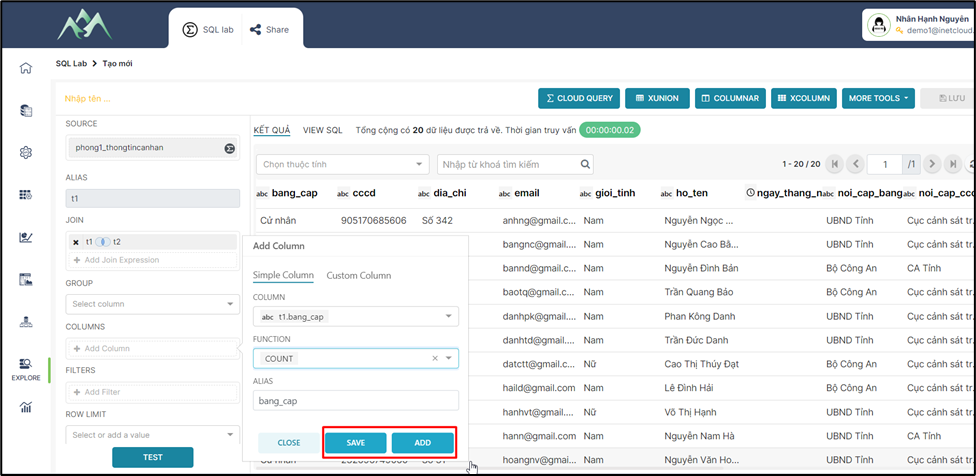
<span style="mso-fareast-font-family: 'Times New Roman';"><span style="mso-list: Ignore;">-<span style="font: 7.0pt 'Times New Roman';"> </span></span></span>Bước 4: Ấn ADD/SAVE để lưu cột dữ liệu vào tập dữ liệu hiện tại. Trong đó: ADD sẽ lưu và hiển thị lại giao diện để thực hiện thêm cột dữ liệu khác, SAVE sẽ lưu cột dữ liệu thêm mới và đóng bảng Add column.
<span style="mso-no-proof: yes;">![](https://book.inetcloud.vn/uploads/images/gallery/2024-07/embedded-image-nevuynsg.png)  
</span>

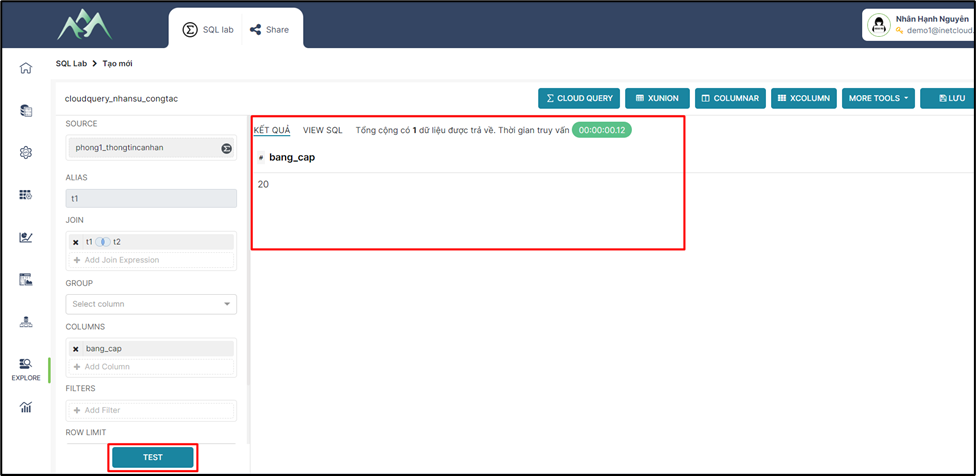
<span style="mso-fareast-font-family: 'Times New Roman';"><span style="mso-list: Ignore;">-<span style="font: 7.0pt 'Times New Roman';"> </span></span></span>Bước 5: Ấn TEST để xem kết quả dữ liệu

<span style="mso-no-proof: yes;">![](https://book.inetcloud.vn/uploads/images/gallery/2024-07/embedded-image-g60os0mc.png)  
</span>