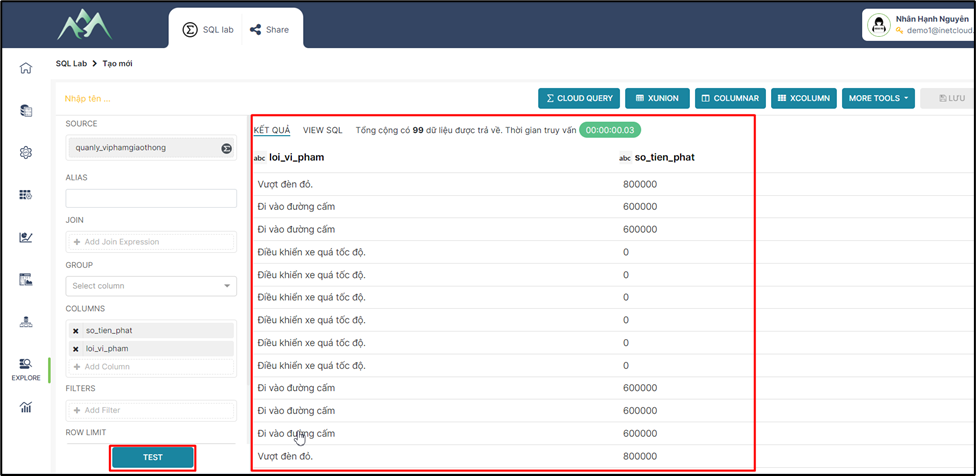
# 2.3. Thêm cột/trường dữ liệu mới dựa trên điều kiện (Custom column - Case)

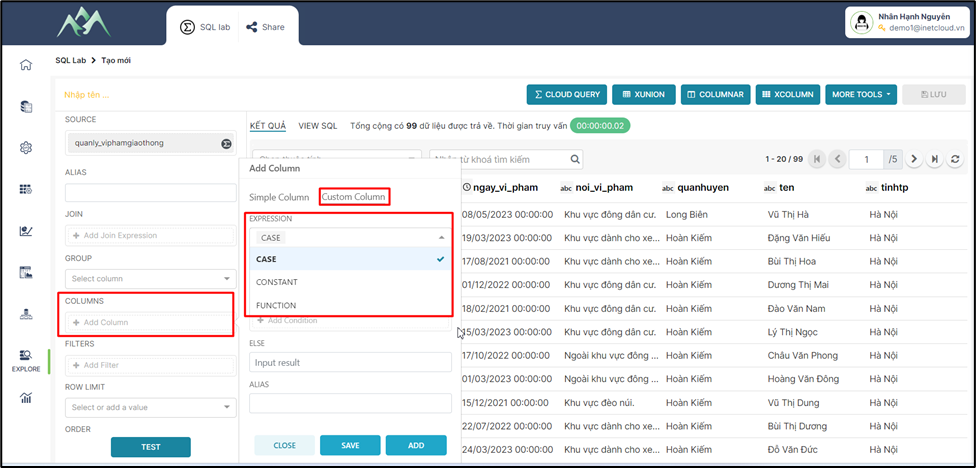
<span style="mso-fareast-font-family: 'Times New Roman';"><span style="mso-list: Ignore;">-<span style="font: 7.0pt 'Times New Roman';"> </span></span></span>Bước 1: Chọn biểu thức CASE thực hiện thêm mới cột/trường dữ liệu.
<span style="mso-no-proof: yes;">![](https://book.inetcloud.vn/uploads/images/gallery/2024-07/embedded-image-sxkvarsf.png)  
</span>

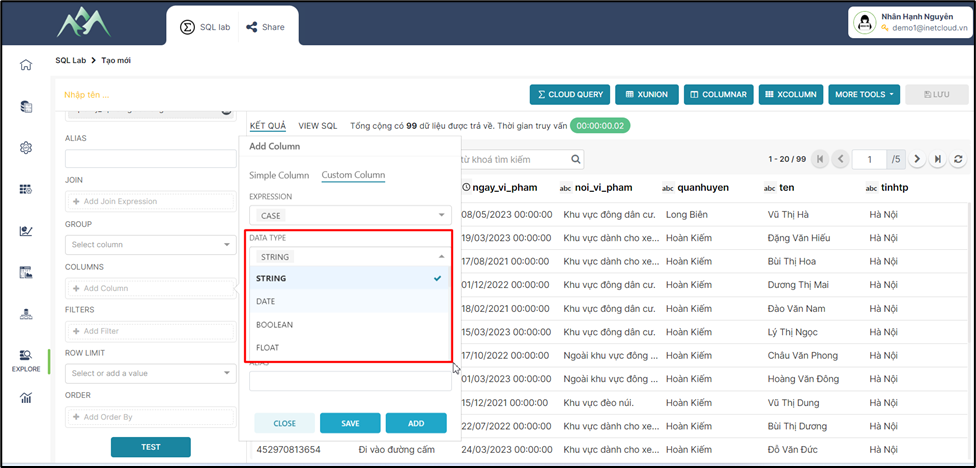
<span style="mso-fareast-font-family: 'Times New Roman';"><span style="mso-list: Ignore;">-<span style="font: 7.0pt 'Times New Roman';"> </span></span></span>Bước 2: Chọn kiểu dữ liệu cho cột/trường dữ liệu mới.
<span style="mso-no-proof: yes;">![](https://book.inetcloud.vn/uploads/images/gallery/2024-07/embedded-image-28ebtz4p.png)  
</span>

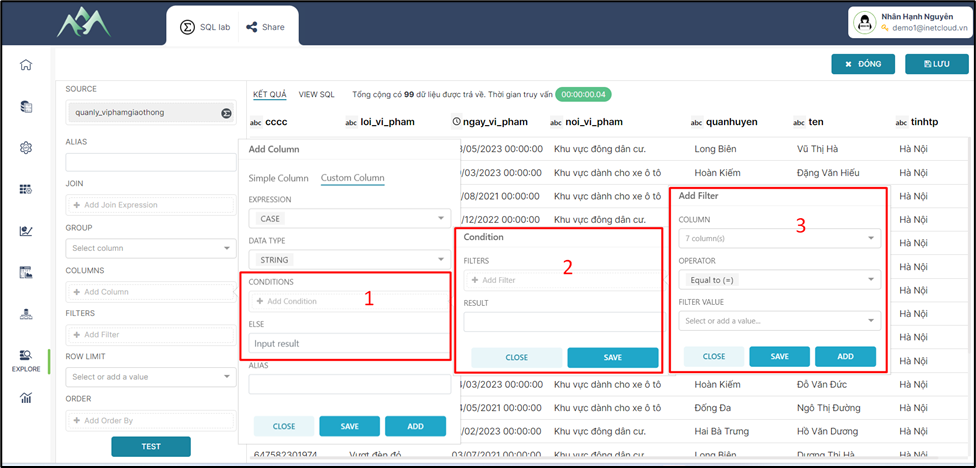
<span style="mso-fareast-font-family: 'Times New Roman';"><span style="mso-list: Ignore;">-<span style="font: 7.0pt 'Times New Roman';"> </span></span></span>Bước 3: Cấu hình điều kiện để lấy dữ liệu cho cột/trường dữ liệu mới.
<span style="mso-no-proof: yes;">![](https://book.inetcloud.vn/uploads/images/gallery/2024-07/embedded-image-1k29tlpl.png)  
</span>

Trong đó:

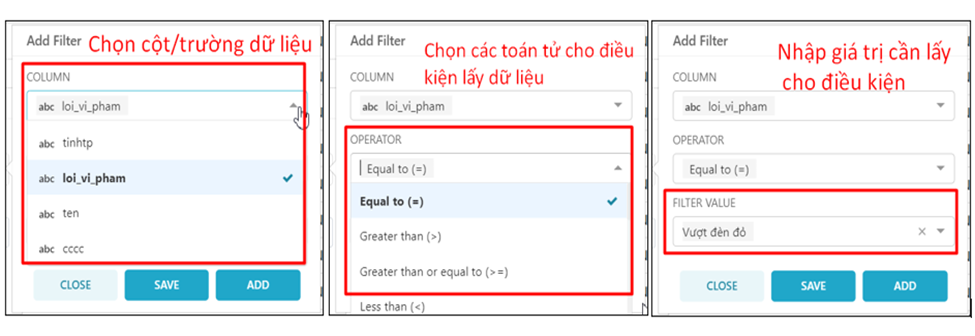
<span style="font-family: 'Courier New'; mso-fareast-font-family: 'Courier New';"><span style="mso-list: Ignore;">o<span style="font: 7.0pt 'Times New Roman';"> </span></span></span>Bảng Add Filter (3): Cấu hình điều kiện lọc cho dữ liệu.
<span style="mso-no-proof: yes;">![](https://book.inetcloud.vn/uploads/images/gallery/2024-07/embedded-image-j7j61o3t.png)  
</span>

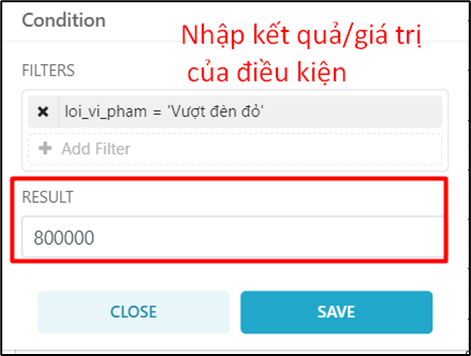
<span style="font-family: 'Courier New'; mso-fareast-font-family: 'Courier New';"><span style="mso-list: Ignore;">o<span style="font: 7.0pt 'Times New Roman';"> </span></span></span>Bảng Condition (2): Cấu hình giá trị tương ứng cho điều kiện lọc dữ liệu.
<span style="mso-no-proof: yes;">![](https://book.inetcloud.vn/uploads/images/gallery/2024-07/embedded-image-elupwl3c.png)  
</span>

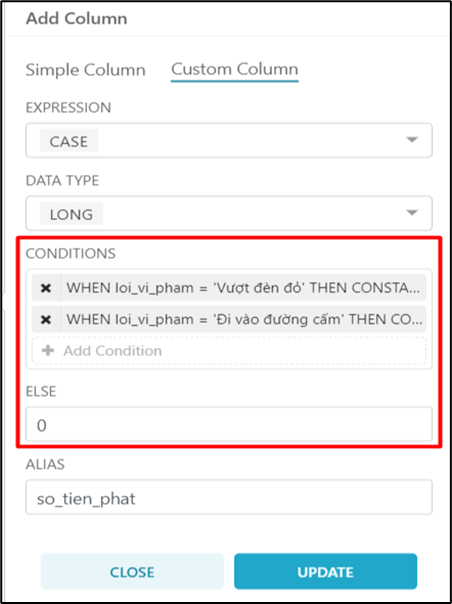
<span style="font-family: 'Courier New'; mso-fareast-font-family: 'Courier New';"><span style="mso-list: Ignore;">o<span style="font: 7.0pt 'Times New Roman';"> </span></span></span>Bảng CONDITIONS (1): Các điều kiện của cột/trường dữ liệu được tạo mới.
<span style="mso-no-proof: yes;">![](https://book.inetcloud.vn/uploads/images/gallery/2024-07/embedded-image-gv25iv01.png)  
</span>

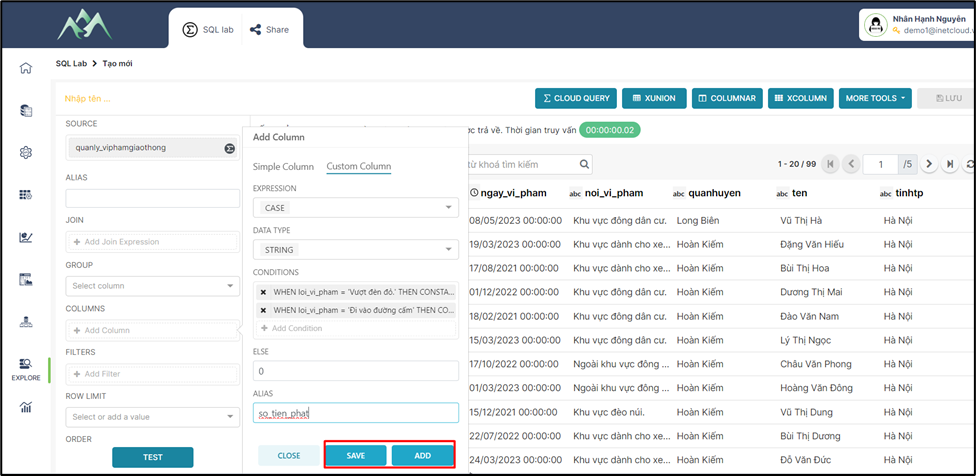
<span style="mso-fareast-font-family: 'Times New Roman';"><span style="mso-list: Ignore;">-<span style="font: 7.0pt 'Times New Roman';"> </span></span></span>Bước 4: Ấn ADD/SAVE để lưu cột dữ liệu vào tập dữ liệu hiện tại. Trong đó: ADD sẽ lưu và hiển thị lại giao diện để thực hiện thêm cột dữ liệu khác, SAVE sẽ lưu cột dữ liệu thêm mới và đóng bảng Add column.
<span style="mso-no-proof: yes;">![](https://book.inetcloud.vn/uploads/images/gallery/2024-07/embedded-image-wr1wymj4.png)  
</span>

<span style="mso-fareast-font-family: 'Times New Roman';"><span style="mso-list: Ignore;">-<span style="font: 7.0pt 'Times New Roman';"> </span></span></span>Bước 5: Ấn TEST để xem kết quả dữ liệu

<span style="mso-no-proof: yes;"></span>

<span style="mso-no-proof: yes;">![](https://book.inetcloud.vn/uploads/images/gallery/2024-07/embedded-image-3mcxjgpz.png)</span>

***<span style="mso-no-proof: yes;">Lưu ý: </span>****<span style="mso-no-proof: yes;">Để hiểu rõ hơn về các biểu thức có thể tham khảo thêm ở tài liệu này</span><span style="mso-no-proof: yes;"><span style="color: rgb(0, 0, 0);"> [https://book.inetcloud.vn/books/tai-lieu-su-dung-cloud-query/chapter/chuong-3-bieu-thuc](https://book.inetcloud.vn/books/tai-lieu-su-dung-cloud-query/chapter/chuong-3-bieu-thuc)</span></span>*