# 2.4. Thêm cột/trường dữ liệu mới với một giá trị cụ thể (Custom column - CONSTANT)

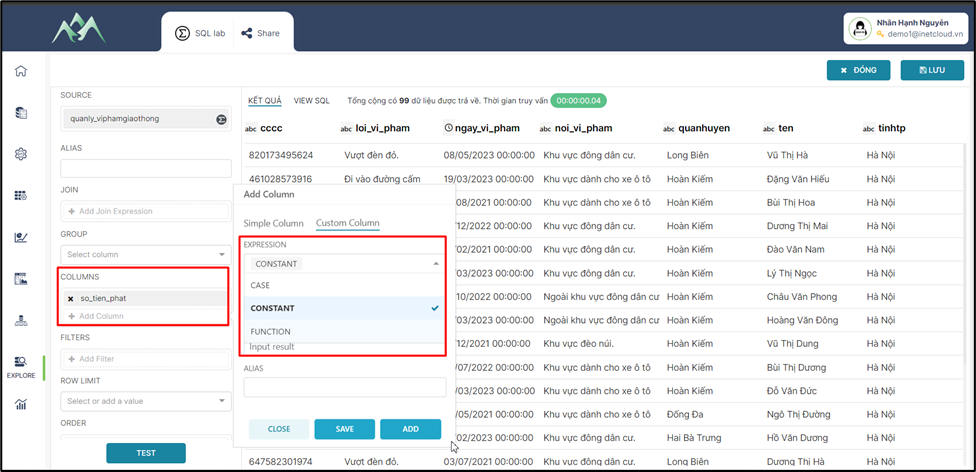
<span style="mso-fareast-font-family: 'Times New Roman';"><span style="mso-list: Ignore;">-<span style="font: 7.0pt 'Times New Roman';"> </span></span></span>Bước 1: Chọn biểu thức CONSTANT thực hiện thêm mới cột/trường dữ liệu.
<span style="mso-no-proof: yes;">![](https://book.inetcloud.vn/uploads/images/gallery/2024-07/embedded-image-0kveudam.png)  
</span>

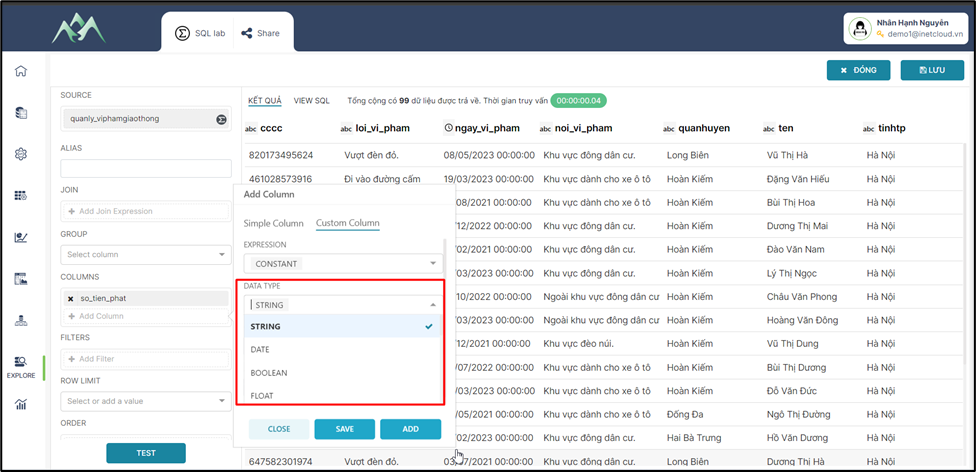
<span style="mso-fareast-font-family: 'Times New Roman';"><span style="mso-list: Ignore;">-<span style="font: 7.0pt 'Times New Roman';"> </span></span></span>Bước 2: Chọn kiểu dữ liệu cho cột/trường dữ liệu mới.
<span style="mso-no-proof: yes;">![](https://book.inetcloud.vn/uploads/images/gallery/2024-07/embedded-image-8sbtlzaa.png)  
</span>

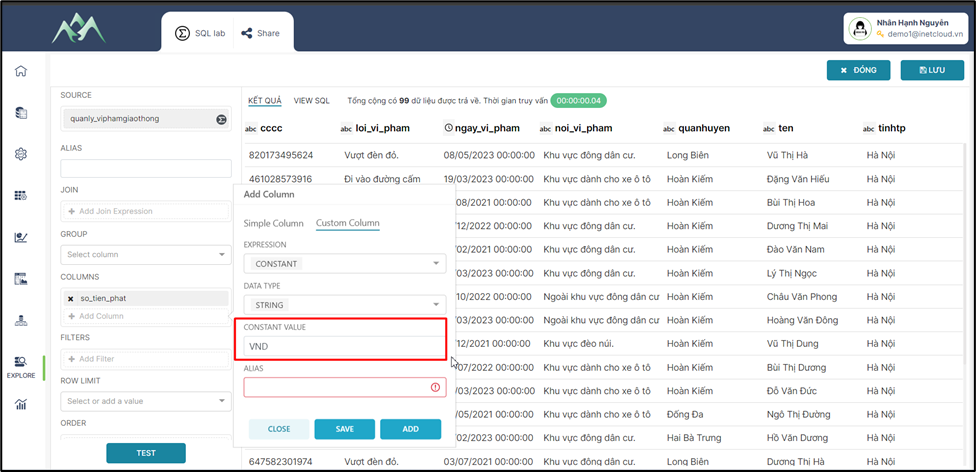
<span style="mso-fareast-font-family: 'Times New Roman';"><span style="mso-list: Ignore;">-<span style="font: 7.0pt 'Times New Roman';"> </span></span></span>Bước 3: Nhập giá trị cho cột/trường dữ liệu thêm mới.
<span style="mso-no-proof: yes;">![](https://book.inetcloud.vn/uploads/images/gallery/2024-07/embedded-image-2jbysfwh.png)  
</span>

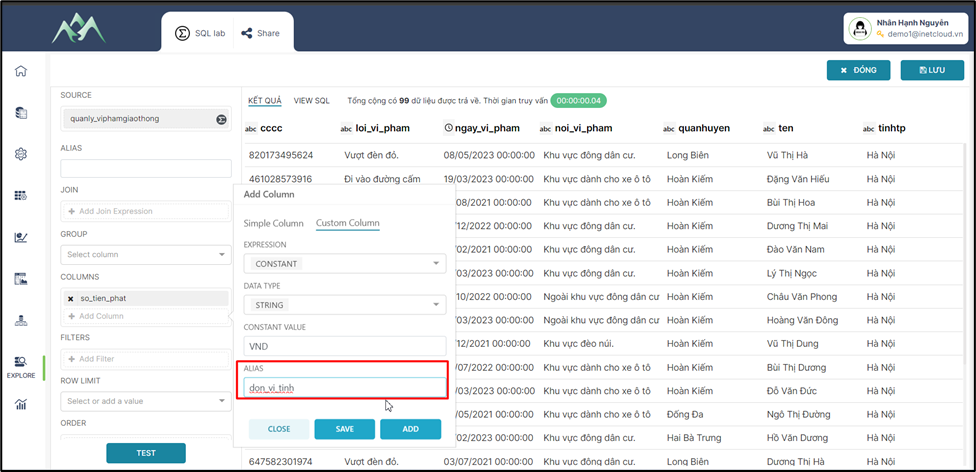
<span style="mso-fareast-font-family: 'Times New Roman';"><span style="mso-list: Ignore;">-<span style="font: 7.0pt 'Times New Roman';"> </span></span></span>Bước 4: Nhập tên cho cột/trường dữ liệu thêm mới
<span style="mso-no-proof: yes;">![](https://book.inetcloud.vn/uploads/images/gallery/2024-07/embedded-image-fglftgxn.png)  
</span>

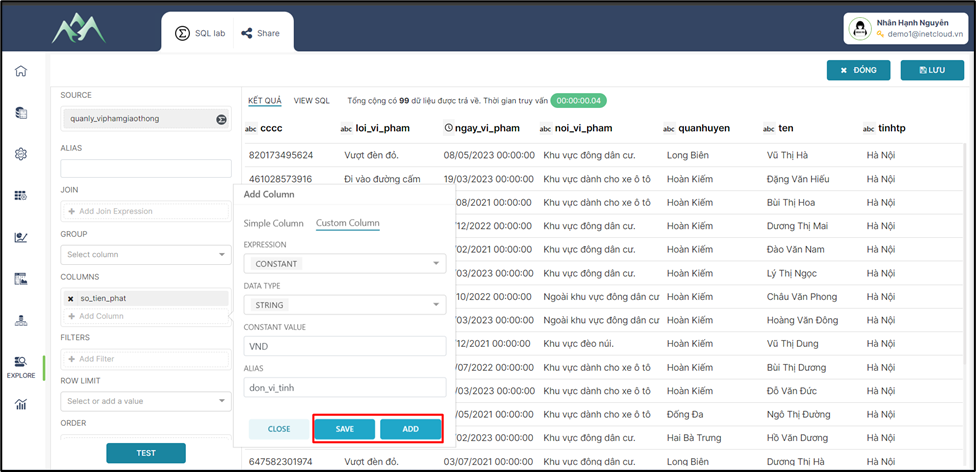
<span style="mso-fareast-font-family: 'Times New Roman';"><span style="mso-list: Ignore;">-<span style="font: 7.0pt 'Times New Roman';"> </span></span></span>Bước 5: Ấn ADD/SAVE để lưu cột dữ liệu vào tập dữ liệu hiện tại. Trong đó: ADD sẽ lưu và hiển thị lại giao diện để thực hiện thêm cột dữ liệu khác, SAVE sẽ lưu cột dữ liệu thêm mới và đóng bảng Add column.
<span style="mso-no-proof: yes;">![](https://book.inetcloud.vn/uploads/images/gallery/2024-07/embedded-image-ztv29ofq.png)  
</span>

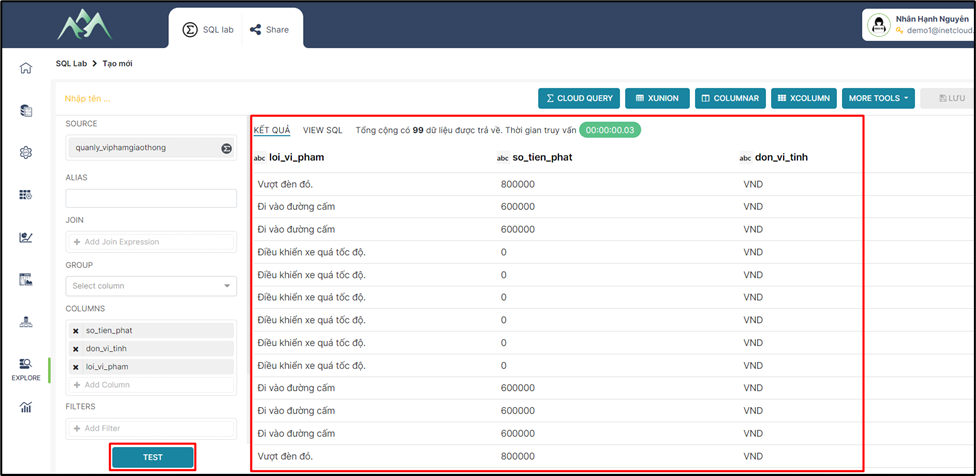
<span style="mso-fareast-font-family: 'Times New Roman';"><span style="mso-list: Ignore;">-<span style="font: 7.0pt 'Times New Roman';"> </span></span></span>Bước 6: Ấn TEST để xem kết quả dữ liệu.
<span style="mso-no-proof: yes;">![](https://book.inetcloud.vn/uploads/images/gallery/2024-07/embedded-image-kcywfkkl.png)  
</span>