# Thực hiện trên hệ thống theo các bước hướng dẫn sau:

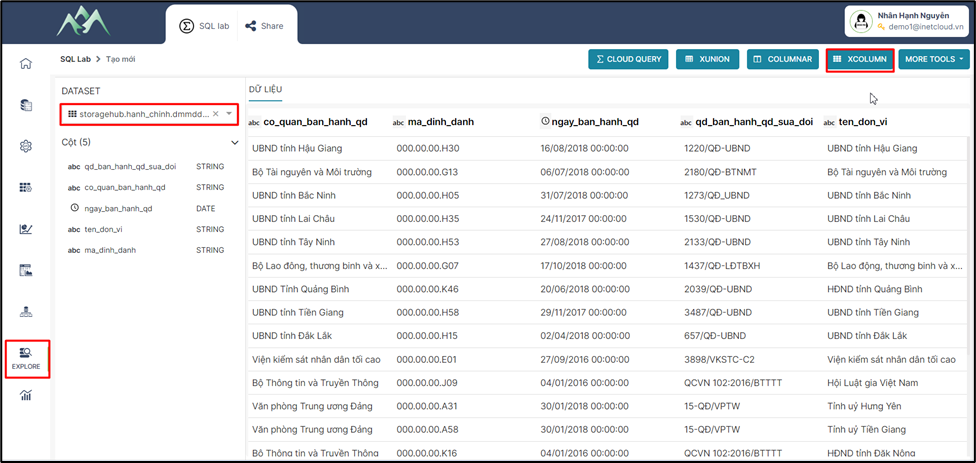
<span style="mso-fareast-font-family: 'Times New Roman';"><span style="mso-list: Ignore;">-<span style="font: 7.0pt 'Times New Roman';"> </span></span></span>Bước 1: Vào hệ thống chọn module Explore, chọn tập dữ liệu cần tổng hợp và tạo mới một tập dữ liệu tổng hợp từ XCOLUMN.
<span style="mso-no-proof: yes;">![](https://book.inetcloud.vn/uploads/images/gallery/2024-07/embedded-image-bvlj9fda.png)  
</span>

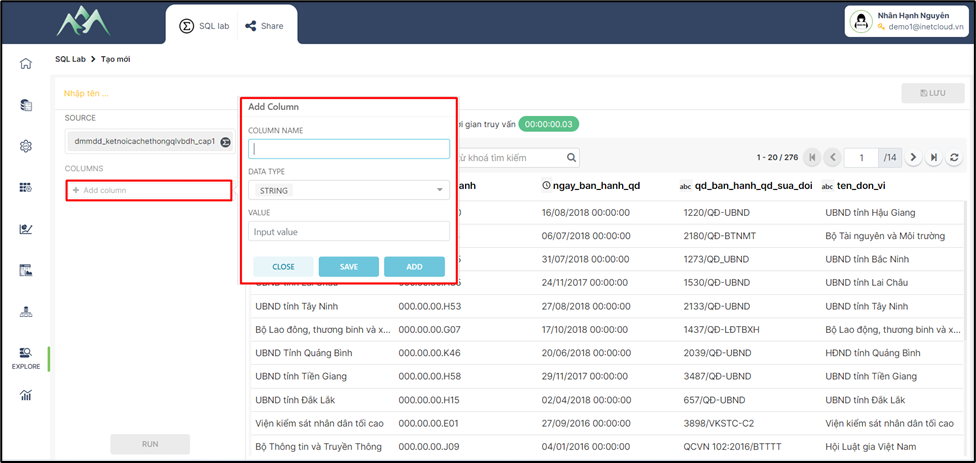
<span style="mso-fareast-font-family: 'Times New Roman';"><span style="mso-list: Ignore;">-<span style="font: 7.0pt 'Times New Roman';"> </span></span></span>Bước 2: Chọn ADD COLUMN để thêm một cột dữ liệu vào tập dữ liệu đang thực hiện.
<span style="mso-no-proof: yes;">![](https://book.inetcloud.vn/uploads/images/gallery/2024-07/embedded-image-j6yz2f1y.png)  
</span>

Trong đó:

<span style="font-family: 'Courier New'; mso-fareast-font-family: 'Courier New';"><span style="mso-list: Ignore;">o<span style="font: 7.0pt 'Times New Roman';"> </span></span></span>COLUMN NAME: Tên cột trường thuộc tính cần thêm vào tập dữ liệu

<span style="font-family: 'Courier New'; mso-fareast-font-family: 'Courier New';"><span style="mso-list: Ignore;">o<span style="font: 7.0pt 'Times New Roman';"> </span></span></span>DATA TYPE: Loại/Kiểu dữ liệu cho trường thuộc tính mới

<span style="font-family: 'Courier New'; mso-fareast-font-family: 'Courier New';"><span style="mso-list: Ignore;">o<span style="font: 7.0pt 'Times New Roman';"> </span></span></span>VALUE: Giá trị của trường thuộc tính mới

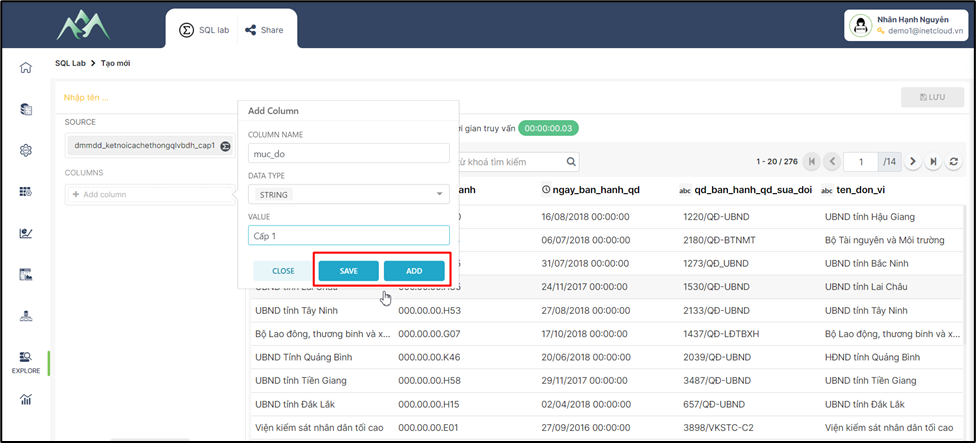
<span style="mso-fareast-font-family: 'Times New Roman';"><span style="mso-list: Ignore;">-<span style="font: 7.0pt 'Times New Roman';"> </span></span></span>Bước 3: Ấn ADD/SAVE để lưu cột dữ liệu vào tập dữ liệu hiện tại. Trong đó: ADD sẽ lưu và hiển thị lại giao diện để thực hiện thêm cột dữ liệu khác, SAVE sẽ lưu cột dữ liệu thêm mới và đóng bảng Add column.
<span style="mso-no-proof: yes;">![](https://book.inetcloud.vn/uploads/images/gallery/2024-07/embedded-image-xbgehm57.png)  
</span>

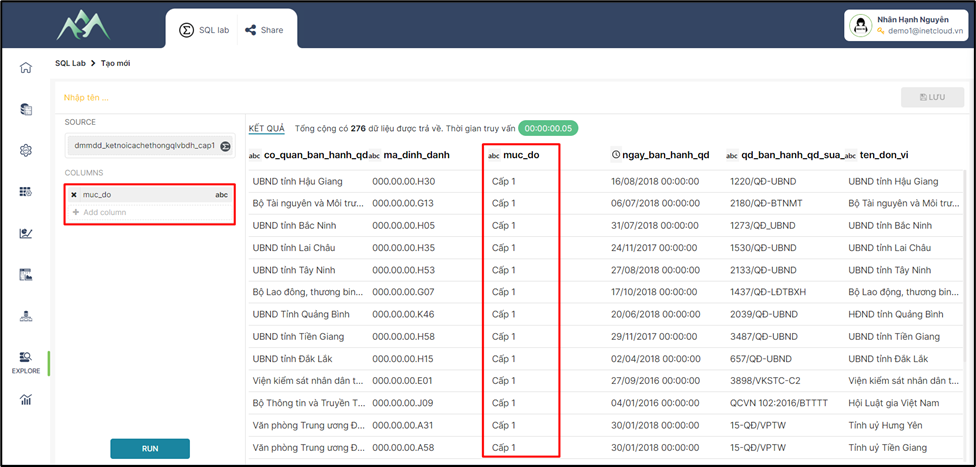
<span style="mso-fareast-font-family: 'Times New Roman';"><span style="mso-list: Ignore;">-<span style="font: 7.0pt 'Times New Roman';"> </span></span></span>Bước 4: Ấn RUN để chạy test dữ liệu thêm mới vào tập dữ liệu.
<span style="mso-no-proof: yes;">![](https://book.inetcloud.vn/uploads/images/gallery/2024-07/embedded-image-7w4sk9fu.png)  
</span>

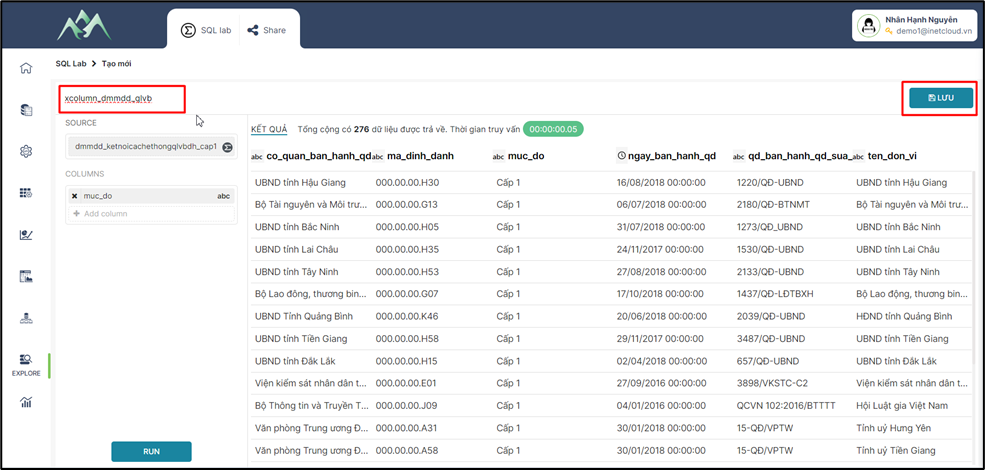
<span style="mso-fareast-font-family: 'Times New Roman';"><span style="mso-list: Ignore;">-<span style="font: 7.0pt 'Times New Roman';"> </span></span></span>Bước 5: Nhập tên cho tập dữ liệu mới được tổng hợp, chọn Lưu thông tin tập dữ liệu được tổng hợp bằng công cụ XCOLUMN.
<span style="mso-no-proof: yes;">![](https://book.inetcloud.vn/uploads/images/gallery/2024-07/embedded-image-fkxievzw.png)  
</span>