# Chương 2. CÚ PHÁP TRUY VẤN


# 2.1. SELECT

Mệnh đề **SELECT** chỉ định danh sách các cột sẽ được trả về bởi truy vấn. Mặc dù nó xuất hiện đầu tiên trong câu lệnh, nhưng về mặt logic, các biểu thức trong mệnh đề này chỉ được thực thi ở giai đoạn cuối cùng. Mệnh đề **SELECT** có thể chứa các biểu thức biến đổi đầu ra, cũng như các hàm tổng hợp.

**<span style="mso-list: Ignore;">a)<span style="font-style: normal; font-variant: normal; font-kerning: auto; font-optical-sizing: auto; font-feature-settings: normal; font-variation-settings: normal; font-stretch: normal; font-size: 7pt; line-height: normal; font-family: 'Times New Roman';"> </span></span>Cú pháp:**

![](https://book.inetcloud.vn/uploads/images/gallery/2024-07/embedded-image-xzq0tsih.png)

**<span style="mso-list: Ignore;">b)<span style="font-style: normal; font-variant: normal; font-kerning: auto; font-optical-sizing: auto; font-feature-settings: normal; font-variation-settings: normal; font-stretch: normal; font-size: 7pt; line-height: normal; font-family: 'Times New Roman';"> </span></span>Ví dụ:**

Chọn tất cả các cột từ bảng "**table"**:

```mssql
SELECT *
FROM table
```

Thực thiện phép tính toán trên cột và thêm bí danh:

```mssql
SELECT add(col1,col2) as res, sqrt(col1) as root
FROM table
```

Trả về tổng số hàng trong bảng:

```mssql
SELECT count(*)
FROM table
```

**SELECT - \***

Chọn tất cả các cột từ bảng “**mat\_hang**”:

```mssql
SELECT *
FROM mat_hang
```

Biểu thức ngôi sao (\*) hoạt động như một ký tự đại diện (wildcard), chỉ định tất cả các cột từ một hoặc nhiều bảng trong truy vấn.

**SELECT - DISTINCT**

Chọn tất cả các mặt hàng duy nhất từ bảng "**mat\_hang".**

```mssql
SELECT DISTINCT *
FROM table
```

Mệnh đề **DISTINCT** có thể được sử dụng để chỉ trả về các hàng duy nhất trong kết quả – do đó, bất kỳ hàng trùng lặp nào cũng sẽ bị lọc ra.

<p class="callout info"><span class="" data-mention="Lưu ý:" id="bkmrk-l%C6%B0u-%C3%BD%3A" style="color: rgb(0, 0, 0);">**Lưu ý:** </span><span class="" data-mention="Các truy vấn bắt đầu bằng SELECT DISTINCT thực hiện việc loại bỏ các bản ghi trùng lặp, đây là một thao tác tốn kém tài nguyên. Do đó, chỉ sử dụng DISTINCT khi thực sự cần thiết." id="bkmrk-c%C3%A1c-truy-v%E1%BA%A5n-b%E1%BA%AFt-%C4%91%E1%BA%A7u">Các truy vấn bắt đầu bằng **SELECT DISTINCT** thực hiện việc loại bỏ các bản ghi trùng lặp, đây là một thao tác tốn kém tài nguyên. Do đó, chỉ sử dụng **DISTINCT** khi thực sự cần thiết.</span></p>

**SELECT – Hàm tổng hợp**

Trả về tổng số hàng trong bảng "**mat\_hang":**

```mssql
SELECT count(*)
FROM table
```

Trả về tổng số hàng trong bảng mat\_hang nhóm theo cột "**mat\_hang":**

```mssql
SELECT city, count(*)
FROM addresses
GROUP BY city;
```

# 2.2. FROM

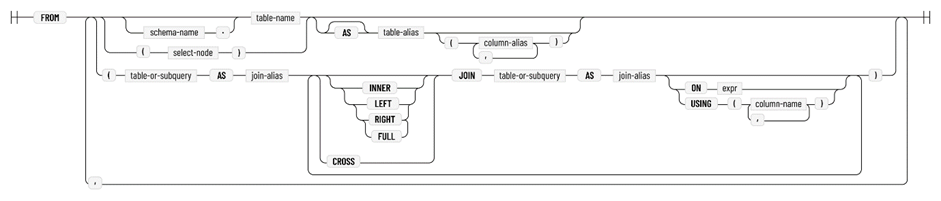
Mệnh đề **FROM** chỉ định nguồn dữ liệu mà phần còn lại của truy vấn sẽ hoạt động trên đó. Về mặt logic, mệnh đề **FROM** là nơi bắt đầu thực hiện truy vấn. Mệnh đề **FROM** có thể chứa một bảng duy nhất, sự kết hợp của nhiều bảng được nối với nhau bằng mệnh đề **JOIN** hoặc một truy vấn **SELECT** khác bên trong truy vấn con.

**<span style="mso-list: Ignore;">a)<span style="font-style: normal; font-variant: normal; font-kerning: auto; font-optical-sizing: auto; font-feature-settings: normal; font-variation-settings: normal; font-stretch: normal; font-size: 7pt; line-height: normal; font-family: 'Times New Roman';"> </span></span>Cú pháp:**

![](https://book.inetcloud.vn/uploads/images/gallery/2024-07/embedded-image-la7a8qsb.png)

<span style="font-size: 12.0pt; line-height: 115%; mso-fareast-font-family: 'Times New Roman'; mso-no-proof: yes;"> </span>

**<span style="mso-list: Ignore;">b)<span style="font-style: normal; font-variant: normal; font-kerning: auto; font-optical-sizing: auto; font-feature-settings: normal; font-variation-settings: normal; font-stretch: normal; font-size: 7pt; line-height: normal; font-family: 'Times New Roman';"> </span></span>Ví dụ:**

Chọn tất cả các cột từ bảng “**table\_name**”:

```mssql
SELECT *
FROM table_name;
```

Chọn tất cả các cột từ bảng “**table\_name**” với bí danh tn:

```mssql
SELECT tn.*
FROM table_name tn;
```

Chọn tất cả các cột từ truy vấn con:

```mssql
SELECT *
FROM (SELECT * FROM table_name);
```

Chọn tất cả các cột từ hai bảng bằng phép "**Joins**":

```mssql
 SELECT *
FROM table_name
JOIN other_table ON (table_name.key = other_table.key);
```

# 2.3. JOINS

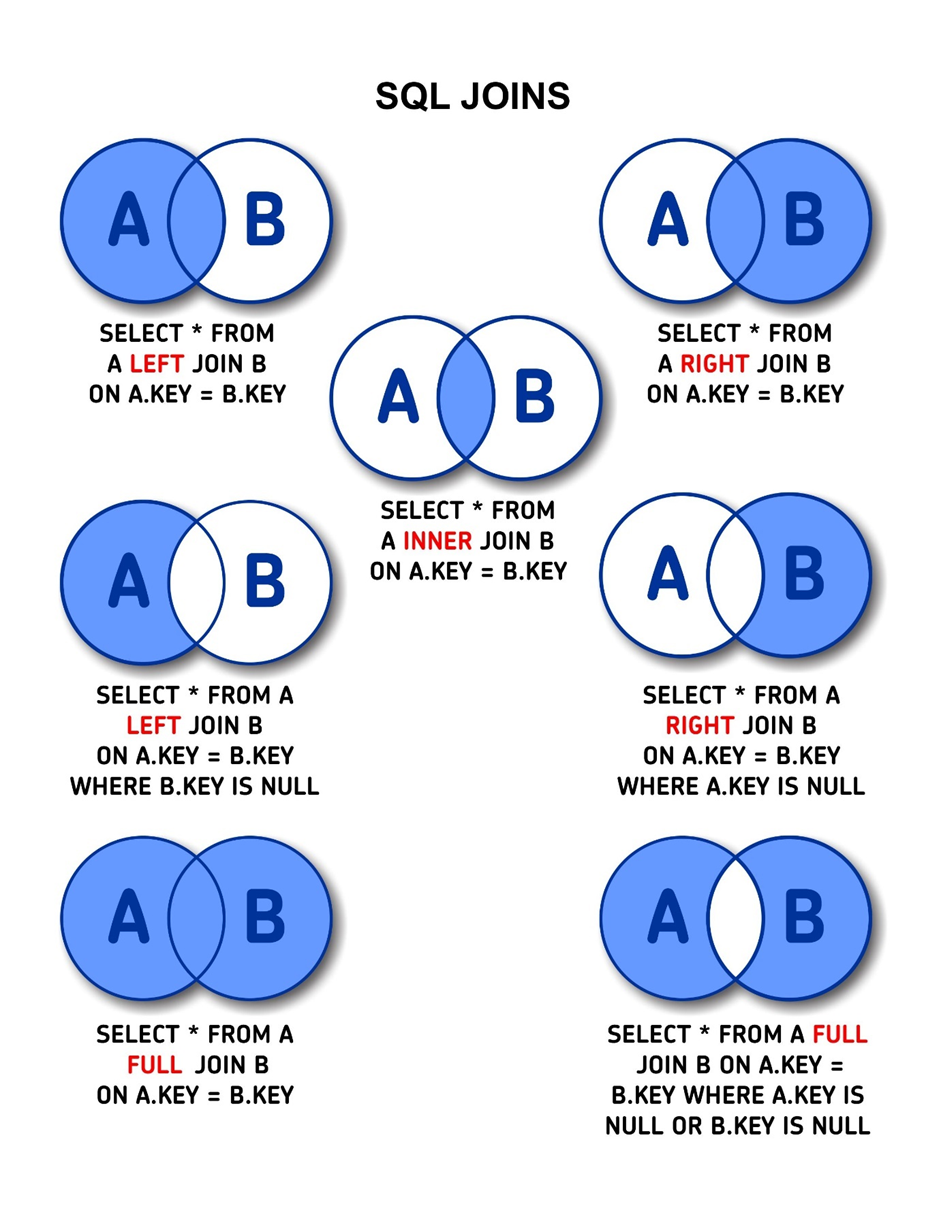
**JOINS** được sử dụng để nối hai bảng theo chiều ngang với mỗi hàng kết quả đều chứa thông tin từ cả hai bảng bên trái và bên phải.

**<span style="mso-list: Ignore;">a)<span style="font-style: normal; font-variant: normal; font-kerning: auto; font-optical-sizing: auto; font-feature-settings: normal; font-variation-settings: normal; font-stretch: normal; font-size: 7pt; line-height: normal; font-family: 'Times New Roman';"> </span></span>Outer Joins &amp; Inner Join**

**Outer Joins** &amp; **Inner Join** sử dụng các điều kiện để khớp các hàng từ hai bảng thông qua mệnh đề ON, thông thường là sử dụng các khóa, Tuy nhiên, cũng có nhiều trường hợp các hàng khớp với nhau thông qua các cột không phải khóa. Ititan cung cấp 4 loại **Outer Join** là: Left join, Right join và Full join

**<span style="mso-list: Ignore;">b)<span style="font-style: normal; font-variant: normal; font-kerning: auto; font-optical-sizing: auto; font-feature-settings: normal; font-variation-settings: normal; font-stretch: normal; font-size: 7pt; line-height: normal; font-family: 'Times New Roman';"> </span></span>Cross Join**

**Cross Join** là phép Joins không cần điều kiện, mỗi hàng từ bảng đầu tiên sẽ được kết hợp với tất cả các hàng từ bảng thứ hai. **Cross Join** thực hiện phép nhân Descartes (Cartesian product) giữa các bảng. Điều này có nghĩa là nó sẽ kết hợp từng hàng của bảng đầu tiên với từng hàng của bảng thứ hai.

**<span style="mso-list: Ignore;">c)<span style="font-style: normal; font-variant: normal; font-kerning: auto; font-optical-sizing: auto; font-feature-settings: normal; font-variation-settings: normal; font-stretch: normal; font-size: 7pt; line-height: normal; font-family: 'Times New Roman';"> </span></span>Minh họa:**

![](https://book.inetcloud.vn/uploads/images/gallery/2024-07/embedded-image-wi6lwazo.png)

# 2.4. WHERE

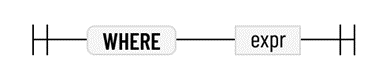
Mệnh đề **WHERE** chỉ định bất kỳ bộ lọc nào để áp dụng cho dữ liệu. Điều này cho phép người sử dụng lọc những thông tin cần thiết. Về mặt logic, mệnh đề **WHERE** được áp dụng ngay sau mệnh đề **FROM**.

**<span style="mso-list: Ignore;">a)<span style="font-style: normal; font-variant: normal; font-kerning: auto; font-optical-sizing: auto; font-feature-settings: normal; font-variation-settings: normal; font-stretch: normal; font-size: 7pt; line-height: normal; font-family: 'Times New Roman';"> </span></span>Cú pháp:**

<span style="font-size: 12.0pt; mso-fareast-font-family: 'Times New Roman'; mso-no-proof: yes;"> </span>

![](https://book.inetcloud.vn/uploads/images/gallery/2024-07/embedded-image-x6nxzfcu.png)

**<span style="mso-list: Ignore;">b)<span style="font-style: normal; font-variant: normal; font-kerning: auto; font-optical-sizing: auto; font-feature-settings: normal; font-variation-settings: normal; font-stretch: normal; font-size: 7pt; line-height: normal; font-family: 'Times New Roman';"> </span></span>Ví dụ:**

Chọn tất cả các hàng có id bằng 3:

```mysql
SELECT *
FROM table_name
WHERE id = 3;

```

Chọn tất cả các hàng khớp với biểu thức "**Like**":

```mysql
SELECT *
FROM table_name
WHERE name LIKE '%mark%';

```

Chọn tất cả các hàng có id bằng 3 hoặc bằng 7:

```mysql
SELECT *
FROM table_name
WHERE id = 3 OR id = 7;

```

# 2.5. GROUP BY

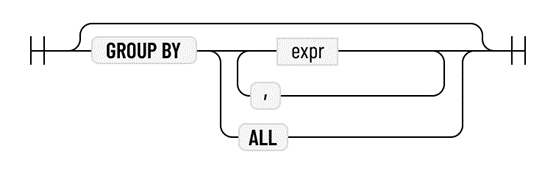
Mệnh đề **GROUP BY** chỉ định những cột nhóm sẽ được sử dụng để thực hiện các phép tổng hợp nào trong mệnh đề **SELECT**. Nếu mệnh đề **GROUP BY** được chỉ định, truy vấn luôn là truy vấn tổng hợp, ngay cả khi không có phép tổng hợp nào có trong mệnh đề **SELECT**.

Khi mệnh đề **GROUP BY** được chỉ định, tất cả các bộ dữ liệu có dữ liệu khớp trong các cột nhóm (tức là tất cả các bộ dữ liệu thuộc cùng một nhóm) sẽ được kết hợp. Các giá trị của chính các cột nhóm không thay đổi và bất kỳ cột nào khác có thể được kết hợp bằng cách sử dụng hàm tổng hợp.

**<span style="mso-list: Ignore;">a)<span style="font-style: normal; font-variant: normal; font-kerning: auto; font-optical-sizing: auto; font-feature-settings: normal; font-variation-settings: normal; font-stretch: normal; font-size: 7pt; line-height: normal; font-family: 'Times New Roman';"> </span></span>Cú pháp:**

![](https://book.inetcloud.vn/uploads/images/gallery/2024-07/embedded-image-cavemnr0.png)

<span style="font-size: 12.0pt; mso-fareast-font-family: 'Times New Roman'; mso-no-proof: yes;"> </span>

**<span style="mso-list: Ignore;">b)<span style="font-style: normal; font-variant: normal; font-kerning: auto; font-optical-sizing: auto; font-feature-settings: normal; font-variation-settings: normal; font-stretch: normal; font-size: 7pt; line-height: normal; font-family: 'Times New Roman';"> </span></span>Ví dụ:**

Đếm số lượng địa chỉ có trong các thành phố khác nhau:

```mysql
SELECT city, count(*)
FROM addresses
GROUP BY city;
```

Tính trung bình thu nhập theo từng khu vực đường trong các thành phố khác nhau:

```mysql
SELECT city, street_name, avg(income)
FROM addresses
GROUP BY city, street_name;
```

# 2.6. ORDER BY

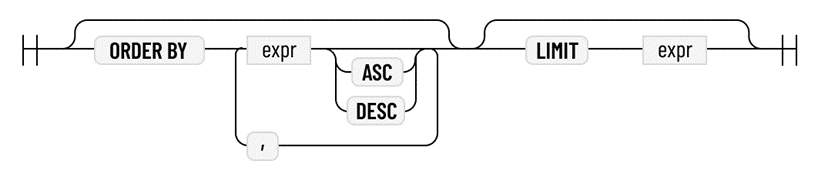
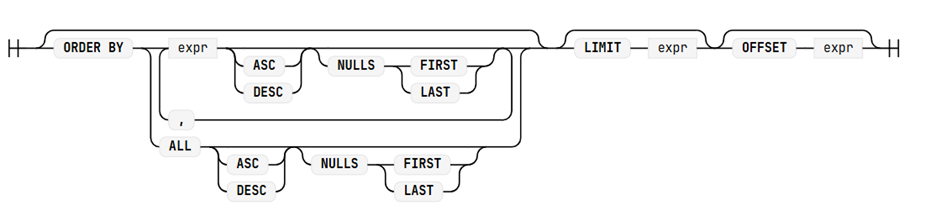
**ORDER BY** sắp xếp kết quả đầu ra của truy vấn. Về mặt logic, nó được áp dụng ở cuối truy vấn. Mệnh đề **ORDER BY** sắp xếp các hàng theo tiêu chí sắp xếp theo thứ tự tăng dần hoặc giảm dần. Mệnh đề **ORDER BY** có thể chứa một hoặc nhiều biểu thức. Mỗi biểu thức có thể tùy ý được theo sau bởi một công cụ sửa đổi thứ tự (ASC hoặc DESC, mặc định là ASC)

**<span style="mso-list: Ignore;">a)<span style="font-style: normal; font-variant: normal; font-kerning: auto; font-optical-sizing: auto; font-feature-settings: normal; font-variation-settings: normal; font-stretch: normal; font-size: 7pt; line-height: normal; font-family: 'Times New Roman';"> </span></span>Cú pháp:**

![](https://book.inetcloud.vn/uploads/images/gallery/2024-07/embedded-image-r8aowmp6.png)

<span style="font-size: 12.0pt; mso-fareast-font-family: 'Times New Roman'; mso-no-proof: yes;"> </span>

**<span style="mso-list: Ignore;">b)<span style="font-style: normal; font-variant: normal; font-kerning: auto; font-optical-sizing: auto; font-feature-settings: normal; font-variation-settings: normal; font-stretch: normal; font-size: 7pt; line-height: normal; font-family: 'Times New Roman';"> </span></span>Ví dụ:**

Sắp xếp thứ tự các hàng dữ liệu theo cột "**city**":

```mysql
SELECT *
FROM table_name
ORDER BY name;

```

Sắp xếp thứ tự các hàng dữ liệu theo cột "**city**" theo thứ tự giảm giần:

```mysql
SELECT *
FROM table_name
ORDER BY city DESC;

```

# 2.7. LIMIT

**LIMIT** là một mệnh đề dùng để giới hạn số lượng hàng dữ liệu được trả về trong một truy vấn . Về mặt logic, nó được áp dụng ở cuối truy vấn. Mệnh đề **LIMIT** hạn chế số lượng hàng được truy vấn.

**<span style="mso-list: Ignore;">a)<span style="font-style: normal; font-variant: normal; font-kerning: auto; font-optical-sizing: auto; font-feature-settings: normal; font-variation-settings: normal; font-stretch: normal; font-size: 7pt; line-height: normal; font-family: 'Times New Roman';"> </span></span>Cú pháp:**

**<span style="mso-no-proof: yes;"> </span>**

![](https://book.inetcloud.vn/uploads/images/gallery/2024-07/embedded-image-7ayb1opb.png)

**<span style="mso-list: Ignore;">b)<span style="font-style: normal; font-variant: normal; font-kerning: auto; font-optical-sizing: auto; font-feature-settings: normal; font-variation-settings: normal; font-stretch: normal; font-size: 7pt; line-height: normal; font-family: 'Times New Roman';"> </span></span>Ví dụ:**

Lấy 5 hàng dữ liệu trong truy vấn.

```mysql
SELECT *
FROM table
LIMIT 5;

```

Lấy 5 giá trị lớn nhất trong cột “**name**”.

```mysql
SELECT city, count(*) AS population
FROM table
GROUP BY name
ORDER BY value DESC
LIMIT 5;

```

<div class="eJOY__extension_root_class" id="bkmrk--2" style="all: unset;"></div>